
TurboGears provides a very convenient messaging system for notifying
information to user in a non-obtrusive way. TGFlash class in tg module
provides support for flashing messages that are stored in a plain
cookie. This class supports fetching flash messages on server side as
well as client side through JavaScript.
The render() method of TGFlash class, when used from Python itself, can be invoked from template to render a flash message. If used on JavaScript, it provides a WebFlash object. It exposes payload() and render() methods to fetch current flash message and render it from JavaScript.
When a TurboGears project is created using ‘quickstart’, it has a Master.html template. It contains the definition of a variable of that flash object. Contents of this flash message received from the controller substitutes the marked placeholder in this template.
The Flash messages are stored in a cookie (whose name by default is webflash) by using tg.flash() method. The message and status parameters are then passed to it.
Appearance of flash message can be customized by applying CSS styling to status code. A ‘quickstarted’ project contains error, warning, info and ok status codes customized by a stylesheet public/css/style.css. More status codes with styles can also be added.
 Change URL to http://localhost:8080/flash and see the flash message differently formatted as per definition in style.css
The render() method of TGFlash class, when used from Python itself, can be invoked from template to render a flash message. If used on JavaScript, it provides a WebFlash object. It exposes payload() and render() methods to fetch current flash message and render it from JavaScript.
When a TurboGears project is created using ‘quickstart’, it has a Master.html template. It contains the definition of a variable of that flash object. Contents of this flash message received from the controller substitutes the marked placeholder in this template.
<py:with vars = "flash = tg.flash_obj.render('flash', use_js = False)">
   <div py:if = "flash" py:replace = "Markup(flash)" />
</py:with>
The tg.flash_obj is the WebFlash object, which is available inside any rendered template by including master.html template. This object permits to retrieve the current flash message and display it.
The Flash messages are stored in a cookie (whose name by default is webflash) by using tg.flash() method. The message and status parameters are then passed to it.
tg.flash('Message', 'status')
If the method that is called flash performs a redirect, then the
flash will be visible inside the redirected page. If the method directly
exposes a template, then the flash will be visible inside the template
itself.Appearance of flash message can be customized by applying CSS styling to status code. A ‘quickstarted’ project contains error, warning, info and ok status codes customized by a stylesheet public/css/style.css. More status codes with styles can also be added.
#flash > .warning {
   color: #c09853;
   background-color: #fcf8e3;
   border-color: #fbeed5;
}

#flash > .ok {
   color: #468847;
   background-color: #dff0d8;
   border-color: #d6e9c6;
}

#flash > .error {
   color: #b94a48;
   background-color: #f2dede;
   border-color: #eed3d7;
}

#flash > .info {
   color: #3a87ad;
   background-color: #d9edf7;
   border-color: #bce8f1;
}
This external style sheet needs to be included in the template −
<link rel = "stylesheet" type = "text/css" media = "screen"
   href = "${tg.url('/css/style.css')}" />
The configuration of any Flash message support can be achieved by setting parameters for configure() method of TGFlash object or in app_cfg.py (in config folder). The configurable parameters are −
| S.No | Parameters & Description |
|---|---|
| 1 | flash.cookie_name Name of the cookie used to store flash messages. Default is webflash. |
| 2 | flash.default_status Default message status if not specified (ok by default) |
| 3 | flash.template Used as the flash template when rendered. |
| 4 | flash.allow_html Turns on/off escaping in flash messages, by default HTML is not allowed. |
| 5 | flash.js_call JavaScript code which will be run when displaying the flash from JavaScript. Default is webflash.render() |
| 6 | flash.js_template string.Template instance used to replace full JavaScript support for flash messages. |
- pop_payload() − function fetches current flash message, status and related information. Getting the flash message will delete the cookie.
- render(container_id, use_js=True) − Render the flash message inside template or provide Javascript support for them.
- container_id is the DIV where the messages will be displayed, while use_js switches between rendering the flash as HTML or for JavaScript usage.
- status − Get only current flash status, getting the flash status will delete the cookie.
- message − Get only current flash message, getting the flash message will delete the cookie.
How to Make a Simple Flash Message?
In the following example, a flash() method is provided in the root controller class. It calls a flash() message which is rendered to the exposed template, flash.htmlfrom hello.lib.base import BaseController from tg import expose, flash, redirect, request class RootController(BaseController): @expose('hello.templates.flash') def flash(self, user = None): if user: flash(message = "Welcome "+user,status = "ok") else: flash(message = "Welcome Guest",status = "info") return {}The code for making flash.html in the templates folder is as follows
<html xmlns = "http://www.w3.org/1999/xhtml"
   xmlns:py = "http://genshi.edgewall.org/"
   xmlns:xi = "http://www.w3.org/2001/XInclude">

   <head>
      <title>TurboGears 2.3: Flash messages>/title>
      <link rel = "stylesheet" type = "text/css" media = "screen"
         href = "${tg.url('/css/style.css')}" />

      <py:with vars = "flash = tg.flash_obj.render('flash', use_js = False)">
         <div py:if = "flash" py:replace = "Markup(flash)" />
      </py:with>

   </head>

   <body>
      <h2>Hello TurboGears</h2>
   </body>

</html>
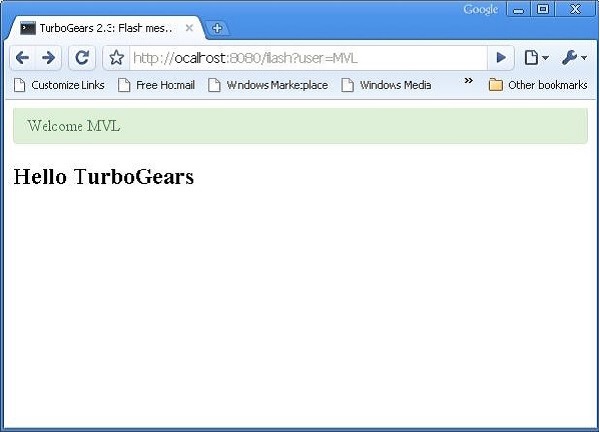
Start the server and enter http://localhost:8080/flash?user=MVL in the browser
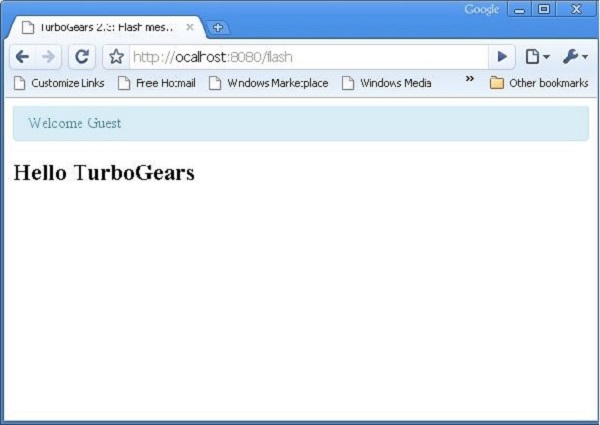
Change URL to http://localhost:8080/flash and see the flash message differently formatted as per definition in style.css

No comments:
Post a Comment