
A TurboGears project contains the following directories −
 In this Hello project, the default controller is created in controllers directory as Hello/hello/controllers.root.py. Let us modify root.py with following code −
After starting server through ‘gearbox serve’ command, http://localhost:8080. Hello World message will be displayed in the browser, even if the following URLs are entered −
http://localhost:8080/
http://localhost:8080/index
All these URLs are mapped to RootController.index() method. This class also has _default() method that will be invoked, whenever a URL is not mapped to any specific function. Response to URL is mapped to a function by @expose() decorator.
It is possible to send a parameter to an exposed function from the URL. The following function reads the name parameter from URL.
Its code is as follow −
- Config − Where project setup and configuration relies
- Controllers − All the project controllers, the logic of web application
- i018n − Translation files for the languages supported
- Lib − Utility python functions and classes
- Model − Database models
- Public Static Files − CSS, JavaScript and images
- Templates − Templates exposed by our controllers.
- Tests − The set of Tests done.
- Websetup − Functions to execute at application setup.
How to Install a project
This project now needs to be installed. A setup.py is already provided in project’s base directory. Project dependencies get installed when this script is executed.Python setup.py developBy default, following dependencies are installed at the time of project set up −
- Beaker
- Genshi
- zope.sqlalchemy
- sqlalchemy
- alembic
- repoze.who
- tw2.forms
- tgext.admin ≥ 0.6.1
- WebHelpers2
- babel
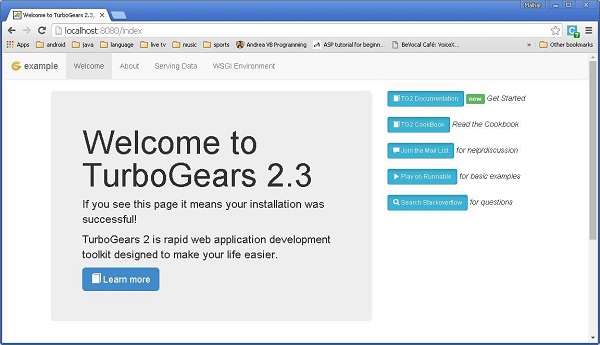
Gearbox serve –reload –debugFollow the above mentioned command to serve a pre-built example project. Open http://localhost:8080 in browser. This readymade sample application gives a brief introduction about TurboGears framework itself.
In this Hello project, the default controller is created in controllers directory as Hello/hello/controllers.root.py. Let us modify root.py with following code −from hello.lib.base import BaseController from tg import expose, flash class RootController(BaseController): movie = MovieController() @expose() def index(self): return "<h1>Hello World</h1>" @expose() def _default(self, *args, **kw): return "This page is not ready"Once a basic working application is ready, more views can be added in the controller class. In the Mycontroller class above, a new method sayHello() is added. The @expose() decorator attaches /sayHello URL to it. This function is designed to accept a name as a parameter from the URL.
After starting server through ‘gearbox serve’ command, http://localhost:8080. Hello World message will be displayed in the browser, even if the following URLs are entered −
http://localhost:8080/
http://localhost:8080/index
All these URLs are mapped to RootController.index() method. This class also has _default() method that will be invoked, whenever a URL is not mapped to any specific function. Response to URL is mapped to a function by @expose() decorator.
It is possible to send a parameter to an exposed function from the URL. The following function reads the name parameter from URL.
@expose()
def sayHello(self, name):
   return '<h3>Hello %s</h3>' %name
The following output will be seen in the browser as response to the URL − http://localhost:8080/?name=MVL
Hello MVLTurboGears automatically maps URL parameters to function arguments. Our RootController class is inherited from BaseController. This is defined as base.py in the lib folder of application.
Its code is as follow −
from tg import TGController, tmpl_context
from tg import request

__all__ = ['BaseController']

def __call__(self, environ, context):
   tmpl_context.identity = request.identity
   return TGController.__call__(self, environ, context)
TGController.__call__ dispatches to the Controller method the request is routed to.


No comments:
Post a Comment