
The following session methods perform CRUD Operations −
First let us design a ToscaWidgets form for entering the student’s data
Hello\hello\controllers.studentform.py
 The above form is designed to be submitted to the ‘/save_record’ URL. Hence a save_record() function needs to be added in the root.py to expose it. The data from the studentform is received by this function as a dict() object. It is used to add a new record in the student table underlying student model.
- DBSession.add(model object) − inserts a record into mapped table.
- DBSession.delete(model object) − deletes record from the table.
- DBSession.query(model).all() − retrieves all the records from table (corresponding to a SELECT query).
DBSession.query(model.student).filter_by(city = ’Hyderabad’).all()We shall now see how to interact with the models through controller URLs.
First let us design a ToscaWidgets form for entering the student’s data
Hello\hello\controllers.studentform.py
import tw2.core as twc
import tw2.forms as twf

class StudentForm(twf.Form):
   class child(twf.TableLayout):
      name = twf.TextField(size = 20)
      city = twf.TextField()
      address = twf.TextArea("",rows = 5, cols = 30)
      pincode = twf.NumberField()

   action = '/save_record'
   submit = twf.SubmitButton(value = 'Submit')
In the RootController (root.py of Hello application), add the following function mapping ‘/add’ URL −
from hello.controllers.studentform import StudentForm

class RootController(BaseController):
   @expose('hello.templates.studentform')
   def add(self, *args, **kw):
      return dict(page='studentform', form = StudentForm)
Save the following HTML code as studentform.html in the templates folder −
<!DOCTYPE html>
<html xmlns = "http://www.w3.org/1999/xhtml"
   xmlns:py = "http://genshi.edgewall.org/"
   lang = "en">

   <head>
      <title>Student Registration Form</title>
   </head>

   <body>
      <div id = "getting_started">
         ${form.display(value = dict(title = 'Enter data'))}
      </div>
   </body>

</html>
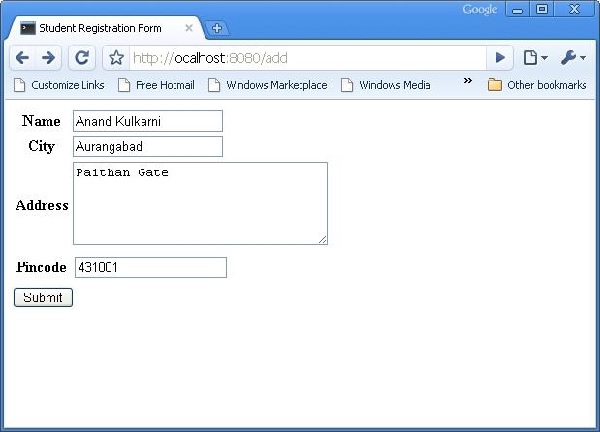
Enter http://localhost:8080/add in the browser after starting the server. The following Student information form will open up in the browser −
The above form is designed to be submitted to the ‘/save_record’ URL. Hence a save_record() function needs to be added in the root.py to expose it. The data from the studentform is received by this function as a dict() object. It is used to add a new record in the student table underlying student model.@expose() #@validate(form = AdmissionForm, error_handler = index1) def save_record(self, **kw): newstudent = student(name = kw['name'],city = kw['city'], address = kw['address'], pincode = kw['pincode']) DBSession.add(newstudent) flash(message = "new entry added successfully") redirect("/listrec")Please note that after the successful addition, the browser will be redirected to ‘/listrec’ URL. This URL is exposed by a listrec() function. This function selects all records in the student table and sends them in the form of a dict object to the studentlist.html template. This listrec() function is as follows −
@expose ("hello.templates.studentlist")
def listrec(self):
   entries = DBSession.query(student).all()
   return dict(entries = entries)
The studentlist.html template iterates through the entries dictionary object using py:for directive. The studentlist.html template is as follows −
<html xmlns = "http://www.w3.org/1999/xhtml"
   xmlns:py = "http://genshi.edgewall.org/">

   <head>
      <link rel = "stylesheet" type = "text/css" media = "screen"
         href = "${tg.url('/css/style.css')}" />
      <title>Welcome to TurboGears</title>
   </head>

   <body>
      <h1>Welcome to TurboGears</h1>

      <py:with vars = "flash = tg.flash_obj.render('flash', use_js = False)">
         <div py:if = "flash" py:replace = "Markup(flash)" />
      </py:with>

      <h2>Current Entries</h2>

      <table border = '1'>
         <thead>
            <tr>
               <th>Name</th>
               <th>City</th>
               <th>Address</th>
               <th>Pincode</th>
            </tr>
         </thead>

         <tbody>
            <py:for each = "entry in entries">
               <tr>
                  <td>${entry.name}</td>
                  <td>${entry.city}</td>
                  <td>${entry.address}</td>
                  <td>${entry.pincode}</td>
               </tr>
            </py:for>
         </tbody>

      </table>

   </body>
</html>
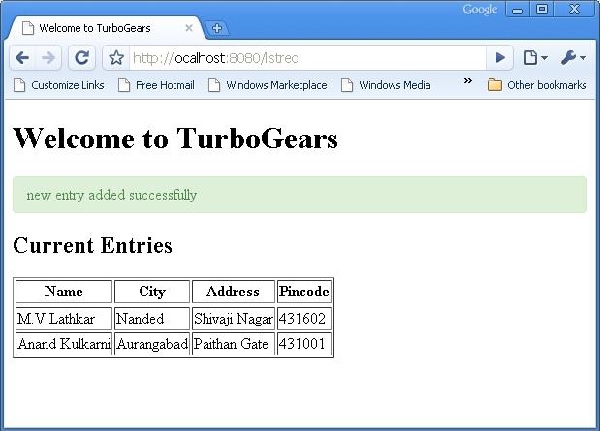
Now revisit the http://localhost:8080/add and enter data in the form. By clicking on the submit button, it will take the browser to studentlist.html. It will also flash a ‘new record added successfully’ message.


No comments:
Post a Comment