
In this chapter, we will study about Function Directives. In
SASS, you can create your own function and use them in your script
context or can be used with any value. Functions are called by using the
function name and with any parameters.
 In the output, you can see that the left-padding is being applied.
Just like mixin, function can also access globally defined variables and can also accept parameters. You should call the return value for the function by using @return. We can call the SASS-defined functions by using keyword parameters.
Call the above function as shown below.
For example, if a function is defined as adjust_width, it can be used as adjust-width, and vice versa.
Example
The following example demonstrates the use of function directive in the SCSS file −function_directive.htm
<html>
   <head>
      <title>Nested Rules</title>
      <link rel = "stylesheet" type = "text/css" href = "style.css" />
      <link rel = "stylesheet" href = "https://maxcdn.bootstrapcdn.com/bootstrap/3.3.5/css/bootstrap.min.css">
      <script src = "https://ajax.googleapis.com/ajax/libs/jquery/2.1.3/jquery.min.js"></script>
      <script src = "https://maxcdn.bootstrapcdn.com/bootstrap/3.3.5/js/bootstrap.min.js"></script>
   </head>

   <body>
      <div class = "container" id = "set_width">
         <h2>Example for Function directives</h2>
         <p>SASS stands for Syntactically Awesome Stylesheet. </p>
      </div>
   </body>
</html>
Next, create file style.scss.
style.scss
$first-width: 5px;
$second-width: 5px;

@function adjust_width($n) {
   @return $n * $first-width + ($n - 1) * $second-width;
}

#set_width { padding-left: adjust_width(10); }
You can tell SASS to watch the file and update the CSS whenever SASS file changes, by using the following command −
sass --watch C:\ruby\lib\sass\style.scss:style.cssNext, execute the above command; it will create the style.css file automatically with the following code −
style.css
#set_width {
   padding-left: 95px;
}
Output
Let us carry out the following steps to see how the above given code works −- Save the above given html code in function_directive.html file.
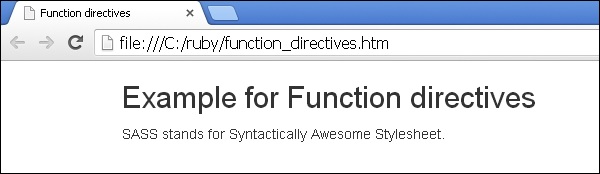
- Open this HTML file in a browser, an output is displayed as shown below.
In the output, you can see that the left-padding is being applied.Just like mixin, function can also access globally defined variables and can also accept parameters. You should call the return value for the function by using @return. We can call the SASS-defined functions by using keyword parameters.
Call the above function as shown below.
#set_width { padding-left: adjust_width($n: 10); }
Naming Conventions
To avoid naming conflicts function names can be prefixed so that they can be easily differentiated. Like mixins, variable arguments are also supported by user-defined functions. Functions and other SASS identifiers can use underscores(_) and hyphens(-) interchangeably.For example, if a function is defined as adjust_width, it can be used as adjust-width, and vice versa.


No comments:
Post a Comment