
A layout defines the surroundings of an HTML page. It's the place to define a common look and feel of your final output. Layout files reside in app/views/layouts.
The process involves defining a layout template and then letting the controller know that it exists and to use it. First, let's create the template.
Add a new file called standard.html.erb to app/views/layouts. You let the controllers know what template to use by the name of the file, so following a same naming scheme is advised.
Add the following code to the new standard.html.erb file and save your changes −
Now open book_controller.rb and add the following line just below the first line −
The process involves defining a layout template and then letting the controller know that it exists and to use it. First, let's create the template.
Add a new file called standard.html.erb to app/views/layouts. You let the controllers know what template to use by the name of the file, so following a same naming scheme is advised.
Add the following code to the new standard.html.erb file and save your changes −
<!DOCTYPE html PUBLIC "-//W3C//DTD XHTML 1.0 Transitional//EN" "http://www.w3.org/TR/xhtml1/DTD/xhtml1-transitional.dtd">

<html xmlns = "http://www.w3.org/1999/xhtml">

   <head>
      <meta http-equiv = "Content-Type" content = "text/html; charset = iso-8859-1" />
      <meta http-equiv = "Content-Language" content = "en-us" />
      <title>Library Info System</title>
      <%= stylesheet_link_tag "style" %>
   </head>

   <body id = "library">
      <div id = "container">

         <div id = "header">
            <h1>Library Info System</h1>
            <h3>Library powered by Ruby on Rails</h3>
         </div>

         <div id = "content">
            <%= yield -%>
         </div>

         <div id = "sidebar"></div>

      </div>
   </body>

</html>
Everything you just added were standard HTML elements except two lines. The stylesheet_link_tag helper method outputs a stylesheet <link>. In this instance, we are linking style.css style sheet. The yield command lets Rails know that it should put the html.erb for the method called here.
Now open book_controller.rb and add the following line just below the first line −
class BookController < ApplicationController
layout 'standard'
def list
@books = Book.all
end
...................
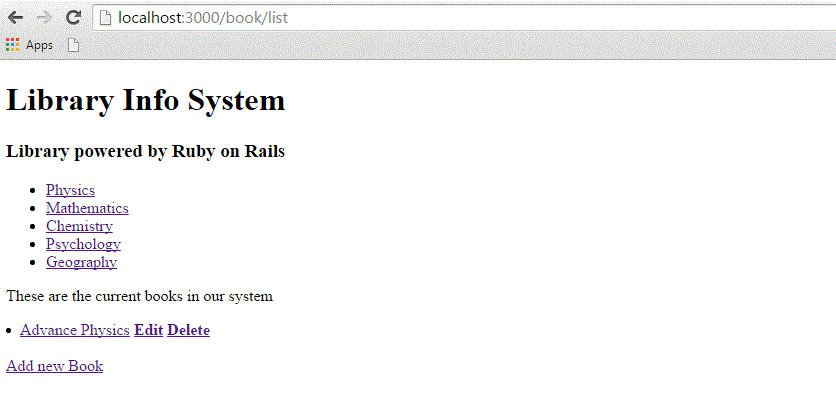
It instructs the controller that we want to use a layout available in the standard.html.erb file. Now try browsing books that will produce the following screen.
Adding Style Sheet
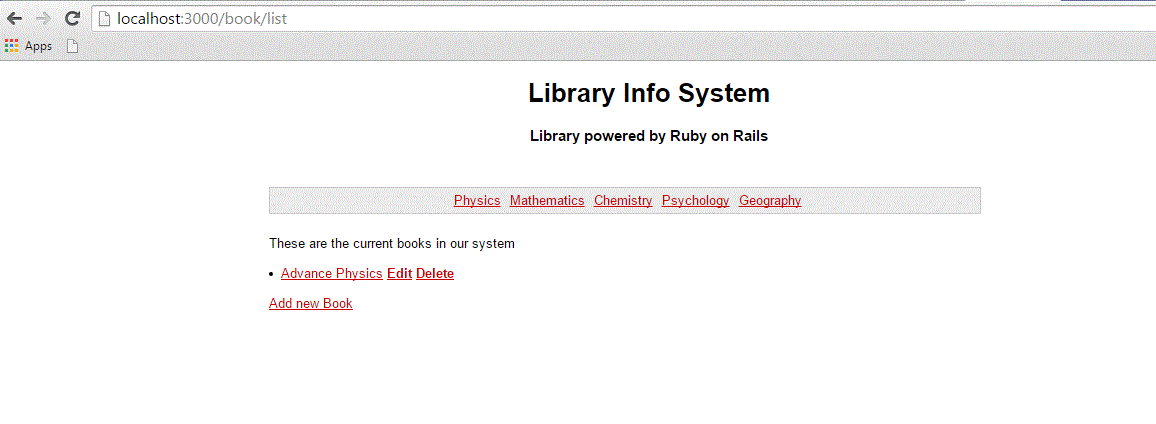
Till now, we have not created any style sheet, so Rails is using the default style sheet. Now let's create a new file called style.css and save it in /public/stylesheets. Add the following code to this file.body { font-family: Helvetica, Geneva, Arial, sans-serif; font-size: small; font-color: #000; background-color: #fff; } a:link, a:active, a:visited { color: #CD0000; } input { margin-bottom: 5px; } p { line-height: 150%; } div#container { width: 760px; margin: 0 auto; } div#header { text-align: center; padding-bottom: 15px; } div#content { float: left; width: 450px; padding: 10px; } div#content h3 { margin-top: 15px; } ul#books { list-style-type: none; } ul#books li { line-height: 140%; } div#sidebar { width: 200px; margin-left: 480px; } ul#subjects { width: 700px; text-align: center; padding: 5px; background-color: #ececec; border: 1px solid #ccc; margin-bottom: 20px; } ul#subjects li { display: inline; padding-left: 5px; }Now refresh your browser and see the difference −


No comments:
Post a Comment