
A typical GUI application may have multiple windows. Tabbed and
stacked widgets allow to activate one such window at a time. However,
many a times this approach may not be useful as view of other windows is
hidden.
One way to display multiple windows simultaneously is to create them as independent windows. This is called as SDI (Single Document Interface). This requires more memory resources as each window may have its own menu system, toolbar, etc.
MDI framework in wxPython provides a wx.MDIParentFrame class. Its object acts as a container for multiple child windows, each an object of wx.MDIChildFrame class.
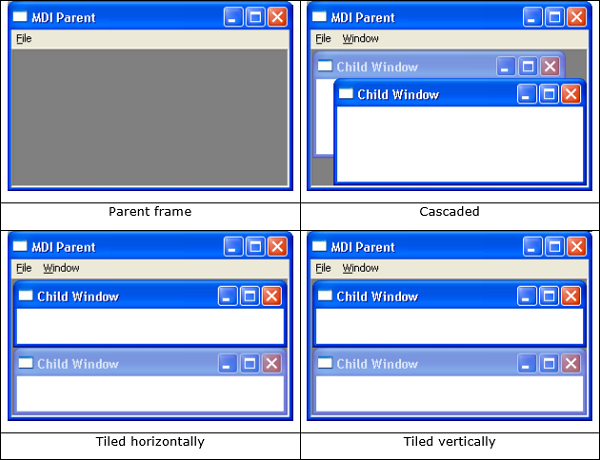
Child windows reside in the MDIClientWindow area of the parent frame. As soon as a child frame is added, the menu bar of the parent frame shows a Window menu containing buttons to arrange the children in a cascaded or tiled manner.
The complete code is as follows −
One way to display multiple windows simultaneously is to create them as independent windows. This is called as SDI (Single Document Interface). This requires more memory resources as each window may have its own menu system, toolbar, etc.
MDI framework in wxPython provides a wx.MDIParentFrame class. Its object acts as a container for multiple child windows, each an object of wx.MDIChildFrame class.
Child windows reside in the MDIClientWindow area of the parent frame. As soon as a child frame is added, the menu bar of the parent frame shows a Window menu containing buttons to arrange the children in a cascaded or tiled manner.
Example
The following example illustrates the uses of MDIParentFrame as top level window. A Menu button called NewWindow adds a child window in the client area. Multiple windows can be added and then arranged in a cascaded or tiled order.The complete code is as follows −
import wx

class MDIFrame(wx.MDIParentFrame):
   def __init__(self):
      wx.MDIParentFrame.__init__(self, None, -1, "MDI Parent", size = (600,400))
      menu = wx.Menu()
      menu.Append(5000, "&New Window")
      menu.Append(5001, "&Exit")
      menubar = wx.MenuBar()
      menubar.Append(menu, "&File")

      self.SetMenuBar(menubar)
      self.Bind(wx.EVT_MENU, self.OnNewWindow, id = 5000)
      self.Bind(wx.EVT_MENU, self.OnExit, id = 5001)

   def OnExit(self, evt):
      self.Close(True)

   def OnNewWindow(self, evt):
      win = wx.MDIChildFrame(self, -1, "Child Window")
      win.Show(True)

app = wx.App()
frame = MDIFrame()
frame.Show()
app.MainLoop()
The above code produces the following output −


No comments:
Post a Comment