Mega widgets include many complex widgets which is often required in
some large scale Tk applications. The list of available mega widgets are
as shown below −
| S.No. |
Widget & Description |
| 1 |
Dialog
Widget for displaying dialog boxes. |
| 2 |
Spinbox
Widget that allows users to choose numbers.
|
| 3 |
Combobox
Widget that combines an entry with a list of choices available to the use. |
| 4 |
Notebook
Tabbed widget that helps to switch between one of several pages, using an index tab. |
| 5 |
Progressbar
Widget to provide visual feedback to the progress of a long operation like file upload. |
| 6 |
Treeview
Widget to display and allow browsing through a hierarchy of items more in form of tree. |
| 7 |
Scrollbar
Scrolling widgets without a text or canvas widgets. |
| 8 |
Scale
Scale widget to choose a numeric value through sliders. |
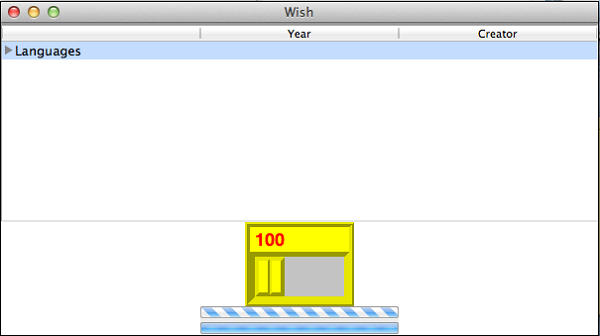
A simple Tk example is shown below using some mega widgets.
#!/usr/bin/wish

ttk::treeview .tree -columns "Creator Year" -displaycolumns "Year Creator"
.tree heading Creator -text "Creator" -anchor center
.tree heading Year -text "Year" -anchor center
pack .tree
.tree insert {} end -id Languages -text "Languages"
.tree insert Languages end -text C -values [list "Dennis Ritchie" "1990"]
proc scaleMe {mywidget scaleValue} {
 $mywidget configure -length $scaleValue
}
pack [scale .s2  -from 100.0 -to 200.0 -length 100 -background yellow -borderwidth 5
   -font{Helvetica -18 bold} -foreground red -width 40 -relief ridge -orien horizontal
   -variable a -command "scaleMe .s2" ]
pack [ttk::progressbar .p1 -orient horizontal -length 200 -mode indeterminate -value 90]
pack [ttk::progressbar .p2 -orient horizontal -length 200 -mode determinate -variable a
   -maximum 75 -value 20]
When we run the above program, we will get the following output −


No comments:
Post a Comment