
Generally, all Mac and Linux mac come with Tk pre-installed. In case,
it's not available or you need the latest version, then you may need to
install it. Windows don't come with Tcl/Tk and you may need to use its
specific binary to install it.
Let's have a helloWorld.tcl file as follows. We will use this as first program, we run on the platform you choose.
Run the downloaded executable to install the Tcl and Tk, which can be done by following the on screen instructions.
Now, we can build and run a Tcl file say helloWorld.tcl by switching to folder containing the file using cd and then using the following step −
Run the downloaded executable to install the Active Tcl, which can be done by following the on screen instructions.
Now, we can build and run a Tcl file say helloWorld.tcl by switching to folder containing the file using cd command and then using the following step −
The Tk Interpreter
It is just a small program that enables you to type Tk commands and have them executed line by line. It stops execution of a tcl file in case, it encounters an error unlike a compiler that executes fully.Let's have a helloWorld.tcl file as follows. We will use this as first program, we run on the platform you choose.
#!/usr/bin/wish

grid [ttk::button .mybutton -text "Hello World"]
The following section explains only how to install Tcl/Tk on each of the available platforms.
Installation on Windows
Download the latest version for windows installer from the list of Active Tcl/Tk binaries available. Active Tcl/Tk community edition is free for personal use.Run the downloaded executable to install the Tcl and Tk, which can be done by following the on screen instructions.
Now, we can build and run a Tcl file say helloWorld.tcl by switching to folder containing the file using cd and then using the following step −
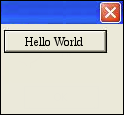
C:\Tcl> wish helloWorld.tclPress enter and we will see an output as shown below −
Installation on Linux
Most Linux operating systems comes with Tk inbuilt and you can get started right away in those systems. In case, it's not available, you can use the following command to download and install Tcl-Tk.$ yum install tcl tkNow, we can build and run a Tcl file say helloWorld.tcl by switching to folder containing the file using cd command and then using the following step −
$ wish helloWorld.tclPress enter and we will see an output similar to the following −
Installation on Debian Based Systems
In case, it's not available prebuilt in your OS, you can use the following command to download and install Tcl-Tk −$ sudo apt-get install tcl tkNow, we can build and run a Tcl file say helloWorld.tcl by switching to folder containing the file using cd command and then using the following steps −
$ wish helloWorld.tclPress enter and we will see an output similar to the following −
Installation on Mac OS X
Download the latest version for Mac OS X package from the list of Active Tcl/Tk binaries available. Active Tcl community edition is free for personal use.Run the downloaded executable to install the Active Tcl, which can be done by following the on screen instructions.
Now, we can build and run a Tcl file say helloWorld.tcl by switching to folder containing the file using cd command and then using the following step −
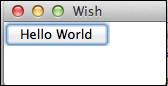
$ wish helloWorld.tclPress enter and we will see an output as shown below −
Installation from Source Files
You can use the option of installing from source files when a binary package is not available. It is generally preferred to use Tk binaries for Windows and Mac OS X, so only compilation of sources on unix based system is shown below −- Download the source files.
- Now, use the following commands to extract, compile and build after switching to the downloaded folder.
$ tar zxf tk8.6.1-src.tar.gz
$ cd tcl8.6.1
$ cd unix
$ ./configure —with-tcl=../../tcl8.6.1/unix —prefix=/opt —enable-gcc
$ make
$ sudo make install
Note − Make sure, you change the file name to the version you downloaded on commands 1 and 2 in the above.


No comments:
Post a Comment