
In this article, we'll demonstrate how to integrate database in JSF using JDBC
Database requirements to run this example
Put PostgreSQL JDBC4 Driver jar in tomcat web server's lib directory
Database requirements to run this example
| S.N. | Software & Description |
|---|---|
| 1 | PostgreSQL 9.1 Open Source and light weight database |
| 2 | PostgreSQL JDBC4 Driver JDBC driver for PostgreSQL 9.1 and JDK 1.5 or above |
Database SQL Commands
create user user1;

create database testdb with owner=user1;

CREATE TABLE IF NOT EXISTS authors (
    id int PRIMARY KEY,
    name VARCHAR(25)
);

INSERT INTO authors(id, name) VALUES(1, 'Rob Bal');
INSERT INTO authors(id, name) VALUES(2, 'John Carter');
INSERT INTO authors(id, name) VALUES(3, 'Chris London');
INSERT INTO authors(id, name) VALUES(4, 'Truman De Bal');
INSERT INTO authors(id, name) VALUES(5, 'Emile Capote');
INSERT INTO authors(id, name) VALUES(7, 'Breech Jabber');
INSERT INTO authors(id, name) VALUES(8, 'Bob Carter');
INSERT INTO authors(id, name) VALUES(9, 'Nelson Mand');
INSERT INTO authors(id, name) VALUES(10, 'Tennant Mark');

alter user user1 with password 'user1';

grant all on authors to user1;
Example Application
Let us create a test JSF application to test jdbc integration.| Step | Description |
|---|---|
| 1 | Create a project with a name helloworld under a package com.tutorialspoint.test as explained in the JSF - First Application chapter. |
| 2 | Create resources folder under src > main folder. |
| 3 | Create css folder under src > main > resources folder. |
| 4 | Create styles.css file under src > main > resources > css folder. |
| 5 | Modify styles.css file as explained below. |
| 6 | Modify pom.xml as explained below. |
| 7 | Create Author.java under package com.tutorialspoint.test as explained below. |
| 8 | Create UserData.java under package com.tutorialspoint.test as explained below. |
| 9 | Modify home.xhtml as explained below. Keep rest of the files unchanged. |
| 10 | Compile and run the application to make sure business logic is working as per the requirements. |
| 11 | Finally, build the application in the form of war file and deploy it in Apache Tomcat Webserver. |
| 12 | Launch your web application using appropriate URL as explained below in the last step. |
styles.css
.authorTable{
   border-collapse:collapse;
   border-bottom:1px solid #000000;
}

.authorTableHeader{
   text-align:center;
   background:none repeat scroll 0 0 #B5B5B5;
   border-bottom:1px solid #000000;
   border-top:1px solid #000000;
   padding:2px;
}

.authorTableOddRow{
   text-align:center;
   background:none repeat scroll 0 0 #FFFFFFF;
}

.authorTableEvenRow{
   text-align:center;
   background:none repeat scroll 0 0 #D3D3D3;
}
pom.xml
<project xmlns="http://maven.apache.org/POM/4.0.0"
   xmlns:xsi="http://www.w3.org/2001/XMLSchema-instance"
   xsi:schemaLocation="http://maven.apache.org/POM/4.0.0
   http://maven.apache.org/maven-v4_0_0.xsd">
   <modelVersion>4.0.0</modelVersion>
   <groupId>com.tutorialspoint.test</groupId>
   <artifactId>helloworld</artifactId>
   <packaging>war</packaging>
   <version>1.0-SNAPSHOT</version>
   <name>helloworld Maven Webapp</name>
   <url>http://maven.apache.org</url>
   <dependencies>
      <dependency>
         <groupId>junit</groupId>
         <artifactId>junit</artifactId>
         <version>3.8.1</version>
         <scope>test</scope>
      </dependency>
      <dependency>
         <groupId>com.sun.faces</groupId>
         <artifactId>jsf-api</artifactId>
         <version>2.1.7</version>
      </dependency>
      <dependency>
         <groupId>com.sun.faces</groupId>
         <artifactId>jsf-impl</artifactId>
         <version>2.1.7</version>
      </dependency>
      <dependency>
         <groupId>javax.servlet</groupId>
         <artifactId>jstl</artifactId>
         <version>1.2</version>
      </dependency>
     <dependency>
        <groupId>postgresql</groupId>
        <artifactId>postgresql</artifactId>
        <version>9.1-901.jdbc4</version>
     </dependency>
   </dependencies>
   <build>
      <finalName>helloworld</finalName>
      <plugins>
         <plugin>
            <groupId>org.apache.maven.plugins</groupId>
            <artifactId>maven-compiler-plugin</artifactId>
            <version>2.3.1</version>
            <configuration>
               <source>1.6</source>
               <target>1.6</target>
            </configuration>
         </plugin>
         <plugin>
            <artifactId>maven-resources-plugin</artifactId>
            <version>2.6</version>
            <executions>
               <execution>
                  <id>copy-resources</id>
                  <phase>validate</phase>
                  <goals>
                     <goal>copy-resources</goal>
                  </goals>
                  <configuration>
                     <outputDirectory>${basedir}/target/helloworld/resources
                        </outputDirectory>
                     <resources>
                        <resource>
                           <directory>src/main/resources</directory>
                           <filtering>true</filtering>
                        </resource>
                     </resources>
                  </configuration>
               </execution>
            </executions>
         </plugin>
      </plugins>
   </build>
</project>
Author.java
package com.tutorialspoint.test;

public class Author {
   int id;
   String name;
   public String getName() {
      return name;
   }
   public void setName(String name) {
      this.name = name;
   }
   public int getId() {
      return id;
   }
   public void setId(int id) {
      this.id = id;
   }
}
UserData.java
package com.tutorialspoint.test;

import java.io.Serializable;
import java.sql.Connection;
import java.sql.DriverManager;
import java.sql.PreparedStatement;
import java.sql.ResultSet;
import java.sql.SQLException;
import java.util.ArrayList;
import java.util.List;

import javax.faces.bean.ManagedBean;
import javax.faces.bean.SessionScoped;
import javax.faces.event.ComponentSystemEvent;

@ManagedBean(name = "userData", eager = true)
@SessionScoped
public class UserData implements Serializable {

   private static final long serialVersionUID = 1L;

   public List<Author> getAuthors(){
      ResultSet rs = null;
      PreparedStatement pst = null;
      Connection con = getConnection();
      String stm = "Select * from authors";
      List<Author> records = new ArrayList<Author>();
      try {
         pst = con.prepareStatement(stm);
         pst.execute();
         rs = pst.getResultSet();

         while(rs.next()){
            Author author = new Author();
            author.setId(rs.getInt(1));
            author.setName(rs.getString(2));
            records.add(author);
         }
      } catch (SQLException e) {
         e.printStackTrace();
      }
      return records;
   }

   public Connection getConnection(){
      Connection con = null;

      String url = "jdbc:postgresql://localhost/testdb";
      String user = "user1";
      String password = "user1";
      try {
         con = DriverManager.getConnection(url, user, password);
         System.out.println("Connection completed.");
      } catch (SQLException ex) {
         System.out.println(ex.getMessage());
      }
      finally{
      }
      return con;
   }
}
home.xhtml
<?xml version="1.0" encoding="UTF-8"?>
<!DOCTYPE html PUBLIC "-//W3C//DTD XHTML 1.0 Transitional//EN"
"http://www.w3.org/TR/xhtml1/DTD/xhtml1-transitional.dtd">
<html xmlns="http://www.w3.org/1999/xhtml"
   xmlns:f="http://java.sun.com/jsf/core"
   xmlns:h="http://java.sun.com/jsf/html">
   <h:head>
      <title>JSF Tutorial!</title>
      <h:outputStylesheet library="css" name="styles.css"  />
   </h:head>
   <h2>JDBC Integration Example</h2>
   <h:dataTable value="#{userData.authors}" var="c"
      styleClass="authorTable"
      headerClass="authorTableHeader"
      rowClasses="authorTableOddRow,authorTableEvenRow">
      <h:column><f:facet name="header">Author ID</f:facet>
         #{c.id}
      </h:column>
      <h:column><f:facet name="header">Name</f:facet>
         #{c.name}
      </h:column>
   </h:dataTable>
   </h:body>
</html>
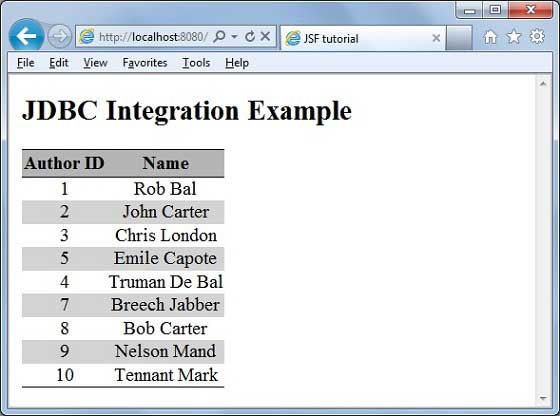
Once you are ready with all the changes done, let us compile and run the application as we did in JSF - First Application chapter. If everything is fine with your application, this will produce following result:


No comments:
Post a Comment