
Adding JavaScript and CSS (Cascading Style Sheet) file in CodeIgniter
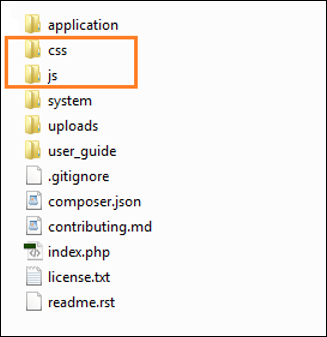
is very simple. You have to create JS and CSS folder in root directory
and copy all the .js files in JS folder and .css files in CSS folder as
shown in the figure.
 For example, let us assume, you have created one JavaScript file sample.js and one CSS file style.css. Now, to add these files into your views, load URL helper in your controller as shown below.
For example, let us assume, you have created one JavaScript file sample.js and one CSS file style.css. Now, to add these files into your views, load URL helper in your controller as shown below.$this->load->helper('url');
After loading the URL helper in controller, simply add the below
given lines in the view file, to load the sample.js and style.css file
in the view as shown below.<link rel = "stylesheet" type = "text/css" href = "<?php echo base_url(); ?>css/style.css"> <script type = 'text/javascript' src = "<?php echo base_url(); ?>js/sample.js"></script>
Example
Create a controller called Test.php and save it in application/controller/Test.php<?php class Test extends CI_Controller { public function index() { $this->load->helper('url'); $this->load->view('test'); } } ?>Create a view file called test.php and save it at application/views/test.php
<!DOCTYPE html>
<html lang = "en">

   <head>
      <meta charset = "utf-8">
      <title>CodeIgniter View Example</title>
      <link rel = "stylesheet" type = "text/css"
         href = "<?php echo base_url(); ?>css/style.css">
      <script type = 'text/javascript' src = "<?php echo base_url();
         ?>js/sample.js"></script>
   </head>

   <body>
      <a href = 'javascript:test()'>Click Here</a> to execute the javascript function.
   </body>

</html>
Create a CSS file called style.css and save it at css/style.css
body {
   background:#000;
   color:#FFF;
}
Create a JS file called sample.js and save it at js/sample.js
function test() {
   alert('test');
}
Change the routes.php file in application/config/routes.php to add route for the above controller and add the following line at the end of the file.
$route['profiler'] = "Profiler_controller";
$route['profiler/disable'] = "Profiler_controller/disable"
Use the following URL in the browser to execute the above example.
http://yoursite.com/index.php/test


No comments:
Post a Comment