
We used a node module, fs, in the previous chapter. We'll now look at
some other node modules that we can use with electron. We'll start off
with the OS module.
Using the same main.js file and the following HTML file, we can print these properties on the screen:
Some of the most useful methods from the module are listed here:
There are a lot of more methods in the net module. To get a more comprehensive list, see this.
Lets create an electron app that uses net module to create connections to the server. We'll need to create a new file, server.js:
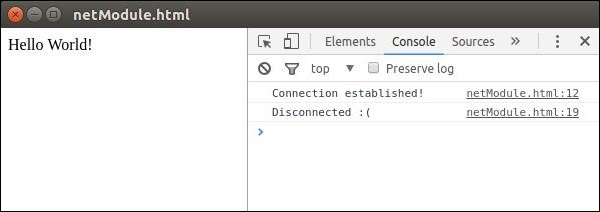 See that we connected to the server automatically and were automatically disconnected.
There are a lot more of node modules that we can directly use on the front end using electron. Usage of them depends on the scenario you use them in.
OS module
Using the os module, we can get a lot of information about the system our application is running on. Following are some of the methods that are quite useful when creating apps, such that we can customize them according to the OS that they are running on.| Function | Description |
|---|---|
| os.userInfo([options]) | The os.userInfo() method returns information about the currently effective user. This information could be used to personalize the application for the user even without explicitly asking for information. |
| os.platform() | The os.platform() method returns a string identifying the operating system platform. This can be used to customize the app according to the user OS. |
| os.homedir() | The os.homedir() method returns the home directory of the current user as a string. Generally configs of all users reside in the home directory of the user. So this can be used for the same purpose for our app. |
| os.arch() | The os.arch() method returns a string identifying the operating system CPU architecture. This can be used when running on exotic architectures to adapt your application for that system. |
| os.EOL | A string constant defining the operating system-specific end-of-line marker. This should be used whenever ending lines in files on the host OS. |
<html>
   <head>
      <title>OS Module</title>
   </head>
   <body>
      <script>
         let os = require('os')
         document.write('User Info: ' + JSON.stringify(os.userInfo()) + '<br>' +
            'Platform: ' + os.platform() + '<br>' +
            'User home directory: ' +  os.homedir() + '<br>' +
            'OS Architecture: ' + os.arch() + '<br>')
      </script>
   </body>
</html>
Now run the app using:
$ electron ./main.jsYou should get the output like:
User Info: {"uid":1000,"gid":1000,"username":"ayushgp","homedir":"/home/ayushgp","shell":"/usr/bin/zsh"}
Platform: linux
User home directory: /home/ayushgp
OS Architecture: x64
net Module
The net module is used for network related work in the app. We can create both servers and socket connections using this module. You'll not generally need this module as it is quite low level. Mostly you'll be using a wrapper module from npm for networking related tasks.Some of the most useful methods from the module are listed here:
| Function | Description |
|---|---|
| net.createServer([options][, connectionListener]) | Creates a new TCP server. The connectionListener argument is automatically set as a listener for the 'connection' event. |
| net.createConnection(options[, connectionListener]) | A factory method, which returns a new 'net.Socket' and connects to the supplied address and port. |
| net.Server.listen(port[, host][, backlog][, callback]) | Begin accepting connections on the specified port and host. If the host is omitted, the server will accept connections directed to any IPv4 address. |
| net.Server.close([callback]) | Finally closed when all connections are ended and the server emits a 'close' event. |
| net.Socket.connect(port[, host][, connectListener]) | Opens the connection for a given socket. If port and host are given, then the socket will be opened as a TCP socket. |
Lets create an electron app that uses net module to create connections to the server. We'll need to create a new file, server.js:
var net = require('net');
var server = net.createServer(function(connection) {
   console.log('Client Connected');

   connection.on('end', function() {
      console.log('client disconnected');
   });
   connection.write('Hello World!\r\n');
   connection.pipe(connection);
});


server.listen(8080, function() {
   console.log('Server running on http://localhost:8080');
});
Using the same main.js file, replace the HTML file with the following:
<html>
   <head>
      <title>net Module</title>
   </head>
   <body>
      <script>
         var net = require('net');
         var client = net.connect({port: 8080}, function() {
            console.log('Connection established!');
         });
         client.on('data', function(data) {
            document.write(data.toString());
            client.end();
         });
         client.on('end', function() {
            console.log('Disconnected :(');
         });
      </script>
   </body>
</html>
Run the server using:
$ node server.jsRun the application using:
$ electron ./main.jsYou should get the output:
See that we connected to the server automatically and were automatically disconnected.There are a lot more of node modules that we can directly use on the front end using electron. Usage of them depends on the scenario you use them in.


No comments:
Post a Comment