
Till the year 2005, the pattern followed in all web applications was
to manage one HTTP request per page. The navigation of one page to
another page required loading the complete page. This would reduce the
performance at a greater level.
Thus, there was a rise in rich client applications which used to embed AJAX, XML, and JSON with them.
Google Maps, Gmail, YouTube, and Facebook are a few examples of AJAX applications.
Ajax is based on the idea of sending HTTP requests using JavaScript; more specifically AJAX relies on the XMLHttpRequest object and its API to perform those operations.
For instance, when the user requests the server for an album object formatted with the JSON format, the server would return the output as following −
 Once the value is submitted by the user, AJAX functionality is
implemented and the screen is redirected to the form as shown below −
Once the value is submitted by the user, AJAX functionality is
implemented and the screen is redirected to the form as shown below −
Thus, there was a rise in rich client applications which used to embed AJAX, XML, and JSON with them.
AJAX
Asynchronous JavaScript and XML (AJAX) is a technique to create fast and dynamic web pages. AJAX allows web pages to be updated asynchronously by exchanging small amounts of data behind the scenes with the server. This means that it is possible to update parts of a web page, without reloading the whole page.Google Maps, Gmail, YouTube, and Facebook are a few examples of AJAX applications.
Ajax is based on the idea of sending HTTP requests using JavaScript; more specifically AJAX relies on the XMLHttpRequest object and its API to perform those operations.
JSON
JSON is a way to carry serialized JavaScript objects in such a way that JavaScript application can evaluate them and transform them into JavaScript objects which can be manipulated later.For instance, when the user requests the server for an album object formatted with the JSON format, the server would return the output as following −
{'description': 'This is a simple demo album for you to test', 'author': ‘xyz’}
Now the data is a JavaScript associative array and the description field can be accessed via −data ['description'];
Applying AJAX to the Application
Consider the application which includes a folder named “media” with index.html and Jquery plugin, and a file with AJAX implementation. Let us consider the name of the file as “ajax_app.py”ajax_app.py
import cherrypy
import webbrowser
import os
import simplejson
import sys

MEDIA_DIR = os.path.join(os.path.abspath("."), u"media")

class AjaxApp(object):
   @cherrypy.expose
   def index(self):
      return open(os.path.join(MEDIA_DIR, u'index.html'))

   @cherrypy.expose
   def submit(self, name):
      cherrypy.response.headers['Content-Type'] = 'application/json'
      return simplejson.dumps(dict(title="Hello, %s" % name))

config = {'/media':
   {'tools.staticdir.on': True,
   'tools.staticdir.dir': MEDIA_DIR,}
}

def open_page():
webbrowser.open("http://127.0.0.1:8080/")
cherrypy.engine.subscribe('start', open_page)
cherrypy.tree.mount(AjaxApp(), '/', config=config)
cherrypy.engine.start()
The class “AjaxApp” redirects to the web page of “index.html”, which is included in the media folder.
<!DOCTYPE html PUBLIC "-//W3C//DTD XHTML 1.0 Strict//EN"
   " http://www.w3.org/TR/xhtml1/DTD/xhtml1-strict.dtd">

<html xmlns = "http://www.w3.org/1999/xhtml" lang = "en" xml:lang = "en">
   <head>
      <title>AJAX with jQuery and cherrypy</title>
      <meta http-equiv = " Content-Type" content = " text/html; charset = utf-8" />
      <script type = " text/javascript" src = " /media/jquery-1.4.2.min.js"></script>

      <script type = " text/javascript">
         $(function() {

            // When the testform is submitted...
            $("#formtest").submit(function() {

               // post the form values via AJAX...
               $.post('/submit', {name: $("#name").val()}, function(data) {

                  // and set the title with the result
                  $("#title").html(data['title']) ;
               });
               return false ;
            });
         });
      </script>

   </head>

   <body>
      <h1 id = "title">What's your name?</h1>
      <form id = " formtest" action = " #" method = " post">
         <p>
            <label for = " name">Name:</label>
            <input type = " text" id = "name" /> <br />
            <input type = " submit" value = " Set" />
         </p>
      </form>
   </body>

</html>
The function for AJAX is included within <script> tags.
Output
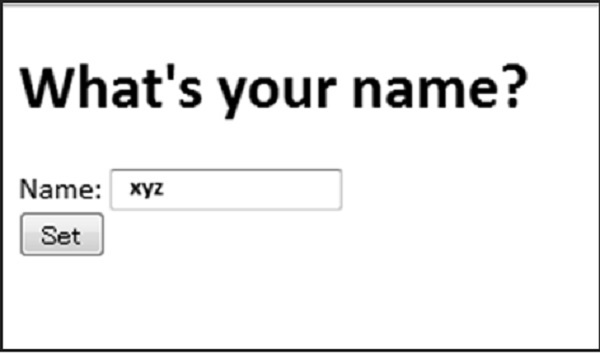
The above code will produce the following output −
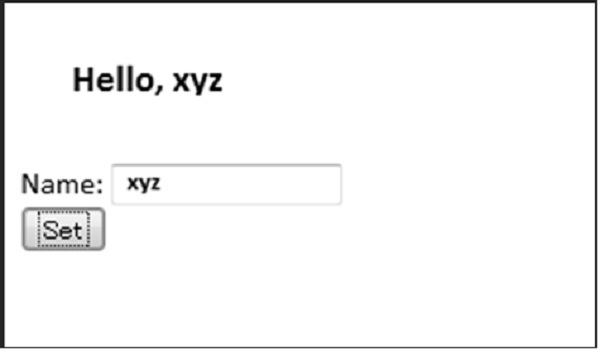
Once the value is submitted by the user, AJAX functionality is
implemented and the screen is redirected to the form as shown below −

No comments:
Post a Comment