
Logging in CakePHP is a very easy task. You just have to use one function. You can log errors, exceptions, user activities, action taken by users, for any background process like cronjob. Logging data in CakePHP is easy − the log() function is provided by the LogTrait, which is the common ancestor for almost all CakePHP classes.
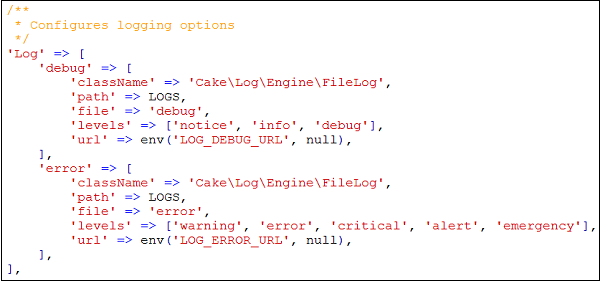 By default, you will see two log levels − error and debug already configured for you. Each will handle different level of messages.
CakePHP supports various logging levels as shown below −
The first is to use the static write() method. The following is the syntax of the static write() method .
The second is to use the log() shortcut function available on any using the LogTrait Calling log() will internally call Log::write()−
config/routes.php
src/Controller/LogexController.php
src/Template/Logexs/index.ctp
http://localhost:85/CakePHP/logex
Logging Configuration
We can configure the log in file config/app.php. There is a log section in the file where you can configure logging options as shown in the following screenshot.
By default, you will see two log levels − error and debug already configured for you. Each will handle different level of messages.CakePHP supports various logging levels as shown below −
- Emergency − System is unusable
- Alert − Action must be taken immediately
- Critical − Critical conditions
- Error − Error conditions
- Warning − Warning conditions
- Notice − Normal but significant condition
- Info − Informational messages
- Debug − Debug-level messages
Writing to Log file
There are two ways by which we can write in a Log file.The first is to use the static write() method. The following is the syntax of the static write() method .
| Syntax | write( integer|string $level , mixed $message , string|array $context[] ) |
|---|---|
| Parameters |
The severity level of the message being written. The value must be an integer or string matching a known level. Message content to log. Additional data to be used for logging the message. The special scope
key can be passed to be used for further filtering of the log engines
to be used. If a string or a numerically index array is passed, it will
be treated as the scope key. See Cake\Log\Log::config() for more information on logging scopes. |
| Returns | boolean |
| Description | Writes the given message and type to all of the configured log adapters. Configured adapters are passed both the $level and $message variables. $level is one of the following strings/values. |
Example
Make changes in the config/routes.php file as shown in the following program.config/routes.php
<?php
   use Cake\Core\Plugin;
   use Cake\Routing\RouteBuilder;
   use Cake\Routing\Router;

   Router::defaultRouteClass('DashedRoute');
   Router::scope('/', function (RouteBuilder $routes) {
      $routes->connect('logex',['controller'=>'Logexs','action'=>'index']);
      $routes->fallbacks('DashedRoute');
   });
   Plugin::routes();
Create a LogexController.php file at src/Controller/LogexController.php. Copy the following code in the controller file.
src/Controller/LogexController.php
<?php
   namespace App\Controller;
   use App\Controller\AppController;
   use Cake\Log\Log;

   class LogexsController extends AppController{
      public function index(){
         /*The first way to write to log file.*/
         Log::write('debug',"Something didn't work.");

         /*The second way to write to log file.*/
         $this->log("Something didn't work.",'debug');
      }
   }
?>
Create a directory Logexs at src/Template and under that directory create a View file called index.ctp. Copy the following code in that file.
src/Template/Logexs/index.ctp
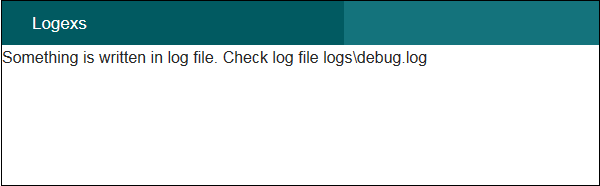
Something is written in log file. Check log file logs\debug.logExecute the above example by visiting the following URL.
http://localhost:85/CakePHP/logex
Output
Upon execution, you will receive the following output.

No comments:
Post a Comment