
MultiView and View controls allow you to divide the content of a page
into different groups, displaying only one group at a time. Each View
control manages one group of content and all the View controls are held
together in a MultiView control.
The MultiView control is responsible for displaying one View control at a time. The View displayed is called the active view.
The syntax of MultiView control is:
The MultiView control has the following important properties:
The CommandName attribute of the button control associated with the
navigation of the MultiView control are associated with some related
field of the MultiView control.
For example, if a button control with CommandName value as NextView is associated with the navigation of the multiview, it automatically navigates to the next view when the button is clicked.
The following table shows the default command names of the above properties:
The important methods of the multiview control are:
Every time a view is changed, the page is posted back to the server
and a number of events are raised. Some important events are:
Apart from the above mentioned properties, methods and events,
multiview control inherits the members of the control and object class.
The content file code is as follows:
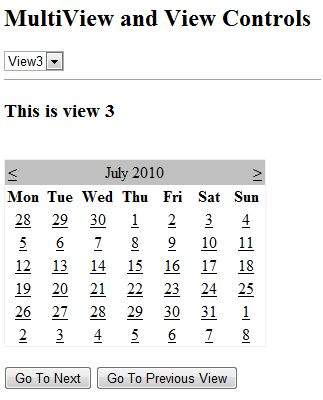
The MultiView.ActiveViewIndex determines which view will be shown. This is the only view rendered on the page. The default value for the ActiveViewIndex is -1, when no view is shown. Since the ActiveViewIndex is defined as 2 in the example, it shows the third view, when executed.
The MultiView control is responsible for displaying one View control at a time. The View displayed is called the active view.
The syntax of MultiView control is:
<asp:MultView ID= "MultiView1" runat= "server">
</asp:MultiView>
The syntax of View control is:
<asp:View ID= "View1" runat= "server">
</asp:View>
However, the View control cannot exist on its own. It would render error if you try to use it stand-alone. It is always used with a Multiview control as:
<asp:MultView ID= "MultiView1" runat= "server">
   <asp:View ID= "View1" runat= "server"> </asp:View>
</asp:MultiView>
Properties of View and MultiView Controls
Both View and MultiView controls are derived from Control class and inherit all its properties, methods, and events. The most important property of the View control is Visible property of type Boolean, which sets the visibility of a view.The MultiView control has the following important properties:
| Properties | Description |
|---|---|
| Views | Collection of View controls within the MultiView. |
| ActiveViewIndex | A zero based index that denotes the active view. If no view is active, then the index is -1. |
For example, if a button control with CommandName value as NextView is associated with the navigation of the multiview, it automatically navigates to the next view when the button is clicked.
The following table shows the default command names of the above properties:
| Properties | Description |
|---|---|
| NextViewCommandName | NextView |
| PreviousViewCommandName | PrevView |
| SwitchViewByIDCommandName | SwitchViewByID |
| SwitchViewByIndexCommandName | SwitchViewByIndex |
| Methods | Description |
|---|---|
| SetActiveview | Sets the active view |
| GetActiveview | Retrieves the active view |
| Events | Description |
|---|---|
| ActiveViewChanged | Raised when a view is changed |
| Activate | Raised by the active view |
| Deactivate | Raised by the inactive view |
Example
The example page has three views. Each view has two button for navigating through the views.The content file code is as follows:
<%@ Page Language="C#" AutoEventWireup="true" CodeBehind="Default.aspx.cs" Inherits="multiviewdemo._Default" %>

<!DOCTYPE html PUBLIC "-//W3C//DTD XHTML 1.0 Transitional//EN" "http://www.w3.org/TR/xhtml1/DTD/xhtml1-transitional.dtd">

<html xmlns="http://www.w3.org/1999/xhtml" >

   <head runat="server">
      <title>
         Untitled Page
      </title>
   </head>

   <body>
      <form id="form1" runat="server">

         <div>
            <h2>MultiView and View Controls</h2>

            <asp:DropDownList ID="DropDownList1" runat="server" onselectedindexchanged="DropDownList1_SelectedIndexChanged">
            </asp:DropDownList>

            <hr />

            <asp:MultiView ID="MultiView1" runat="server" ActiveViewIndex="2"  onactiveviewchanged="MultiView1_ActiveViewChanged" >
               <asp:View ID="View1" runat="server">
                  <h3>This is view 1</h3>
                  <br />
                  <asp:Button CommandName="NextView" ID="btnnext1" runat="server" Text = "Go To Next" />
                  <asp:Button CommandArgument="View3" CommandName="SwitchViewByID" ID="btnlast" runat="server" Text  ="Go To Last" />
               </asp:View>

               <asp:View ID="View2" runat="server">
                  <h3>This is view 2</h3>
                  <asp:Button CommandName="NextView" ID="btnnext2" runat="server" Text = "Go To Next" />
                  <asp:Button CommandName="PrevView" ID="btnprevious2" runat="server" Text = "Go To Previous View" />
               </asp:View>

               <asp:View ID="View3" runat="server">
                  <h3> This is view 3</h3>
                  <br />
                  <asp:Calendar ID="Calender1" runat="server"></asp:Calendar>
                  <br />
                  <asp:Button  CommandArgument="0" CommandName="SwitchViewByIndex" ID="btnfirst"   runat="server" Text = "Go To Next" />
                  <asp:Button CommandName="PrevView" ID="btnprevious" runat="server" Text = "Go To Previous View" />
               </asp:View>

            </asp:MultiView>
         </div>

      </form>
   </body>
</html>
Observe the following:
The MultiView.ActiveViewIndex determines which view will be shown. This is the only view rendered on the page. The default value for the ActiveViewIndex is -1, when no view is shown. Since the ActiveViewIndex is defined as 2 in the example, it shows the third view, when executed.


No comments:
Post a Comment