
In this chapter, we will study about Reading Settings in
WordPress. Reading Setting is used to set the content related to the
front page. You can set the number of post to be displayed on the main
page.
Following are the steps to access the reading settings −
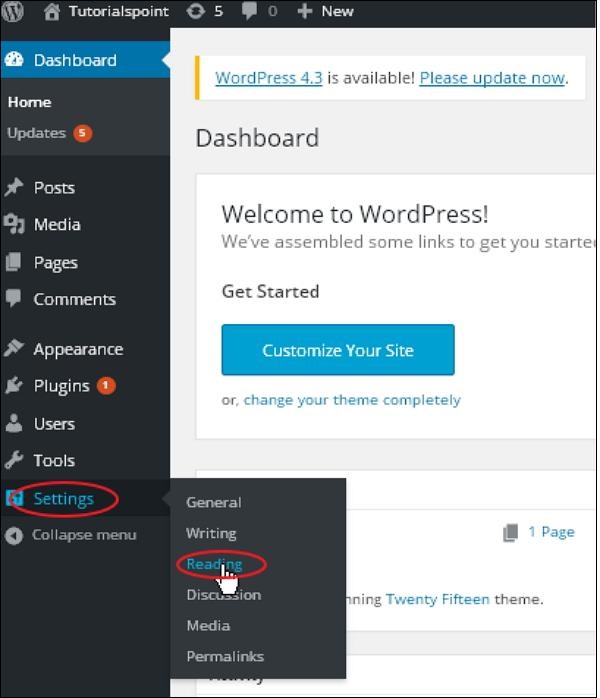
Step (1) − Click on Settings → Reading option in WordPress.
 Step(2) − The Reading Settings page is displayed as shown in the following screen.
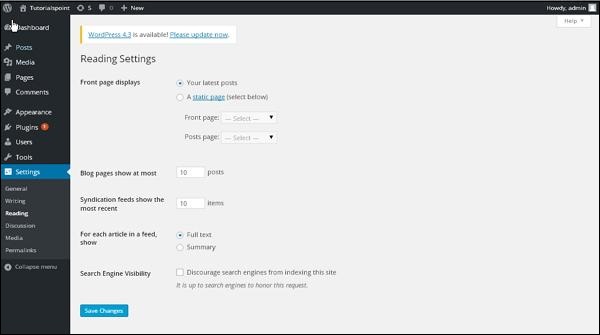 Following are the details of the fields on reading settings.
Following are the steps to access the reading settings −
Step (1) − Click on Settings → Reading option in WordPress.
Step(2) − The Reading Settings page is displayed as shown in the following screen.
Following are the details of the fields on reading settings.- Front page displays − This section is used to display the front page in any of the following format −
- Your latest posts − It displays latest posts on the front page.
- A static page − It displays the static pages on the front page.
- Front Page − You can select the actual page you want to display on front page from the drop down.
- Posts Page − You can select the page from the drop down which contains posts.
- Blog pages show at most − The number of posts to be displayed per page or site. By default, it is set as 10.
- Syndication feeds show the most recent − The user can view the number of posts when they download one of the site feeds. By default, it is set as 10.
- For each article in a feed, show − This section is used to display the post by selecting any of the following formats −
- Full Text − It displays the complete post. It is set as default.
- Summary − It displays the summary of the post.
- Search Engine Visibility − After clicking on the checkbox, Discourage search engines from indexing this site, your site will be ignored by the search engine.


No comments:
Post a Comment