
Using VBA, you can generate charts based on certain criteria. Let us take a look at it using an example.
Step 1 − Enter the data against which the graph has to be generated.
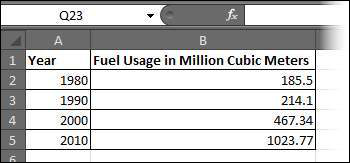 Step 2 − Create 3 buttons - one to generate a bar graph, another to generate a pie chart, and another to generate a column chart.
 Step 3 − Develop a Macro to generate each one of these type of charts.
Step 1 − Enter the data against which the graph has to be generated.
Step 2 − Create 3 buttons - one to generate a bar graph, another to generate a pie chart, and another to generate a column chart.
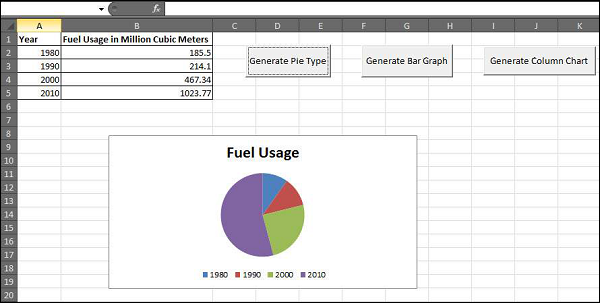
Step 3 − Develop a Macro to generate each one of these type of charts.' Procedure to Generate Pie Chart Private Sub fn_generate_pie_graph_Click() Dim cht As ChartObject For Each cht In Worksheets(1).ChartObjects cht.Chart.Type = xlPie Next cht End Sub ' Procedure to Generate Bar Graph Private Sub fn_Generate_Bar_Graph_Click() Dim cht As ChartObject For Each cht In Worksheets(1).ChartObjects cht.Chart.Type = xlBar Next cht End Sub ' Procedure to Generate Column Graph Private Sub fn_generate_column_graph_Click() Dim cht As ChartObject For Each cht In Worksheets(1).ChartObjects cht.Chart.Type = xlColumn Next cht End SubStep 4 − Upon clicking the corresponding button, the chart is created. In the following output, click on generate Pie Chart button.


No comments:
Post a Comment