
NetRexx is the java implementation of Rexx. In NetRexx, the
implementer is used to convert the Rexx program to a java program which
can then be run on any Java virtual machine.
Step 1 − Go to the NetRexx download site − https://www.netrexx.org/downloads.nsp
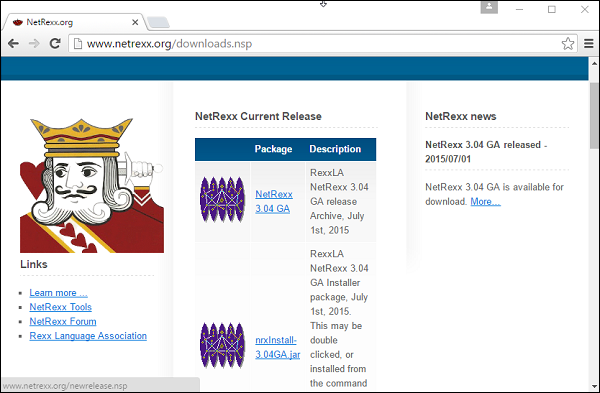 Download the NetRexx.3.04.GA file.
Step 2 − Ensure that java is installed and running on your system. You can verify that java is running by using the java–version command.
An example of the output is shown below.
Step 4 − Add the NetRexx-3.04GA\bin path to the path variable on the system.
Setting up NetRexx
The first step in NetRexx is to set it up on the local machine. To do this, one needs to perform the following steps −Step 1 − Go to the NetRexx download site − https://www.netrexx.org/downloads.nsp
Download the NetRexx.3.04.GA file.Step 2 − Ensure that java is installed and running on your system. You can verify that java is running by using the java–version command.
An example of the output is shown below.
H:\>java -version
java version "1.7.0_79"
Java(TM) SE Runtime Environment (build 1.7.0_79-b15)
Java HotSpot(TM) Client VM (build 24.79-b02, mixed mode, sharing)
Step 3 − Unzip the contents of the Netrexx zipped file. Copy the files from the NetRexx3.04GA\lib folder to your java installation/lib/etc folder.
Step 4 − Add the NetRexx-3.04GA\bin path to the path variable on the system.
Running the First NetRexx Program
Create a file called main.nrx and place the following code in the file./* Main program */ say ‘hello’To compile the code run the following command.
NetRexxC main.nrxYou will then get the following output. NetRexxC is the compiler which converts the rexx program to its java equivalent.
java -cp ";;G:\NetRexx-3.04GA\lib\NetRexxF.jar;."
-Dnrx.compiler = ecj org.netrexx.process.NetRexxC  main.nrx
NetRexx portable processor 3.04 GA build 4-20150630-1657
Copyright (c) RexxLA, 2011,2015.   All rights reserved.
Parts Copyright (c) IBM Corporation, 1995,2008.
Program main.nrx
Compilation of 'main.nrx' successful
You can now run your java program using the following java command.
java mainWhen you run the above command, you will get the following output.
HelloLet us now discuss some of the special aspects of the Netrexx library.
Indexed Strings
In NetRexx, strings can become the indexes to arrays. An example is shown below.Example
/* Main program */
value = 'unknown'
value['a'] = 'b'
c = 'a'
say value[c]
When we run the above program, we will get the following result.
Output
b
Multiple Indexes
In NetRexx, you can have multiple indexes for arrays. An example is shown below.Example
/* Main program */
value = 'null'
value['a', 'b'] = 1
say value['a', 'b']
When we run the above program we will get the following result.
Output
1
| S.No. | Command & Description |
|---|---|
| 1 | ask Command This command is used to read a line from the default input stream. |
| 2 | digits Command This command is used to display the current value of the digits’ value. |
| 3 | form Command This command is used to display the current value of the form value. |
| 4 | length Command This command is used to display the length of a string value. |
| 5 | version Command This command is used to return the current version of NetRexx being used. |
| 6 | trace Command This command is used to return the current trace setting being used by NetRexx. |


No comments:
Post a Comment