
Now that we are well aquainted with Socket.IO, let us write a chat
application which we can use to chat on different chat rooms. We will
allow users to choose a username and allow them to chat using them. So
first let us set up our HTML file to request for a username:
 Once you have provided an acceptable username, you'll be taken to a screen with a message box and a button to send messages.
Now we need to handle and direct the messages to connected client. For that modify your app.js file to include the following changes:
<!DOCTYPE html>
<html>
    <head><title>Hello world</title></head>
    <script src="/socket.io/socket.io.js"></script>
    <script>
      var socket = io();
    </script>
    <body>
        <input type="text" name="name" value="" placeholder="Enter your name!">
        <button type="button" name="button">Let me chat!</button>
    </body>
</html>
Now that we've set up our HTML to request for a username, let us create the server to accept connections from the client. We will allow people to send their chosen usernames using the setUsername event. If user exists, we'll respond by a userExists event, else using a userSet event.
var app = require('express')();
var http = require('http').Server(app);
var io = require('socket.io')(http);

app.get('/', function(req, res){
  res.sendfile('index.html');
});
users = [];
io.on('connection', function(socket){
  console.log('A user connected');
  socket.on('setUsername', function(data){
    if(users.indexOf(data) > -1){
      users.push(data);
      socket.emit('userSet', {username: data});
    }
    else{
      socket.emit('userExists', data + ' username is taken! Try some other username.');
    }
  })
});
http.listen(3000, function(){
  console.log('listening on localhost:3000');
});
We need to send the username to the server when people click on the button. If user exists, we show an error message, else we show a messaging screen:
<!DOCTYPE html>
<html>
    <head><title>Hello world</title></head>
    <script src="/socket.io/socket.io.js"></script>
    <script>
      var socket = io();
        function setUsername(){
            socket.emit('setUsername', document.getElementById('name').value);
        };
        var user;
        socket.on('userExists', function(data){
            document.getElementById('error-container').innerHTML = data;
        });
        socket.on('userSet', function(data){
            user = data.username;
            document.body.innerHTML = '<input type="text" id="message">\
            <button type="button" name="button" onclick="sendMessage()">Send</button>\
            <div id="message-container"></div>';
        });
        function sendMessage(){
            var msg = document.getElementById('message').value;
            if(msg){
                socket.emit('msg', {message: msg, user: user});
            }
        }
        socket.on('newmsg', function(data){
            if(user){
                document.getElementById('message-container').innerHTML += '<div><b>' + data.user + '</b>: ' + data.message + '</div>'
            }
        })
    </script>
    <body>
        <div id="error-container"></div>
        <input id="name" type="text" name="name" value="" placeholder="Enter your name!">
        <button type="button" name="button" onclick="setUsername()">Let me chat!</button>
    </body>
</html>
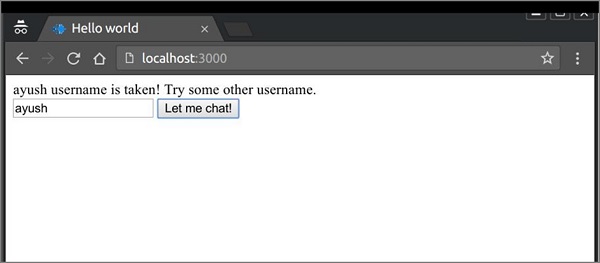
Now if you connect 2 clients with same username, it'll give you an error like below:
Once you have provided an acceptable username, you'll be taken to a screen with a message box and a button to send messages. Now we need to handle and direct the messages to connected client. For that modify your app.js file to include the following changes:
var app = require('express')();
var http = require('http').Server(app);
var io = require('socket.io')(http);

app.get('/', function(req, res){
  res.sendfile('index.html');
});
users = [];
io.on('connection', function(socket){
  console.log('A user connected');
  socket.on('setUsername', function(data){
    console.log(data);
    if(users.indexOf(data) > -1){
      socket.emit('userExists', data + ' username is taken! Try some other username.');
    }
    else{
      users.push(data);
      socket.emit('userSet', {username: data});
    }
  });
  socket.on('msg', function(data){
      //Send message to everyone
      io.sockets.emit('newmsg', data);
  })
});
http.listen(3000, function(){
  console.log('listening on localhost:3000');
});
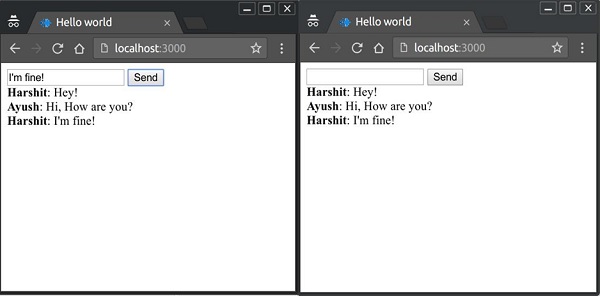
Now connect any number of clients to your server, provide them a username and start chatting! In the following example I connnected 2 clients with names Ayush and Harshit and sent some messages from both the clients:


No comments:
Post a Comment