
In this chapter, you will acquaint yourself with the commonly used
excel VBA terminologies. These terminologies will be used in further
modules, hence understanding each one of these is important.
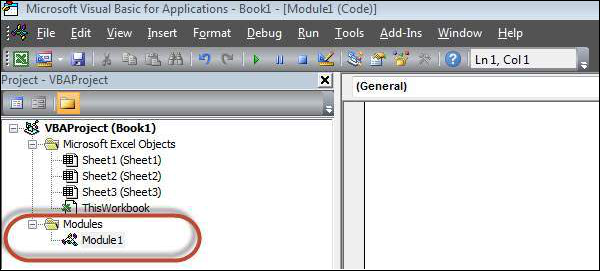
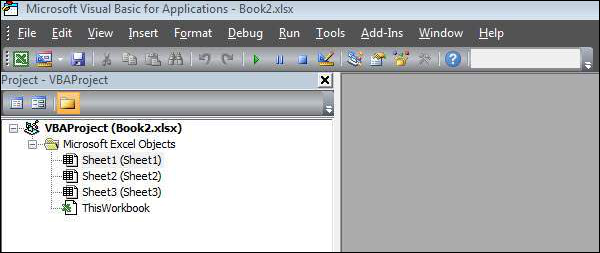 To insert a Module, navigate to Insert → Module. Once a module is inserted 'module1' is created.
Within the modules, we can write VBA code and the code is written within a Procedure. A Procedure/Sub Procedure is a series of VBA statements instructing what to do.
The two main types of Procedures are Sub and Function.
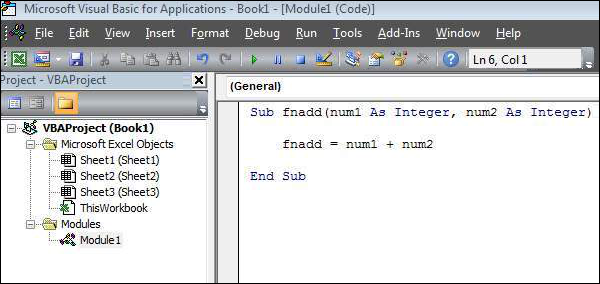
Apart from inbuilt Functions, VBA allows to write user-defined functions as well and statements are written between Function and End Function.
Modules
Modules is the area where the code is written. This is a new Workbook, hence there aren't any Modules.
To insert a Module, navigate to Insert → Module. Once a module is inserted 'module1' is created.Within the modules, we can write VBA code and the code is written within a Procedure. A Procedure/Sub Procedure is a series of VBA statements instructing what to do.
Procedure
Procedures are a group of statements executed as a whole, which instructs Excel how to perform a specific task. The task performed can be a very simple or a very complicated task. However, it is a good practice to break down complicated procedures into smaller ones.The two main types of Procedures are Sub and Function.
Function
A function is a group of reusable code, which can be called anywhere in your program. This eliminates the need of writing the same code over and over again. This helps the programmers to divide a big program into a number of small and manageable functions.Apart from inbuilt Functions, VBA allows to write user-defined functions as well and statements are written between Function and End Function.


No comments:
Post a Comment