
When visitors browse your website and there is some problem accessing
your website, your webserver automatically provides a basic error page.
A Basic error page shown by apache webserver, when an error is
encountered.
A Basic page contains the error code and error message only. You can customize this error page according to your choice. Each problem your webserver encounters has a unique error code; your webserver displays the error accordingly.
To modify an error page, follow these steps −
Step 1 − Open cPanel Error Pages interface by clicking on Error Pages link found in the advanced section of the cPanel Home.
 Step 2 − In Error Pages interface, select the domain or
subdomain for which you want to configure the error pages from the drop
down menu.
Step 2 − In Error Pages interface, select the domain or
subdomain for which you want to configure the error pages from the drop
down menu.
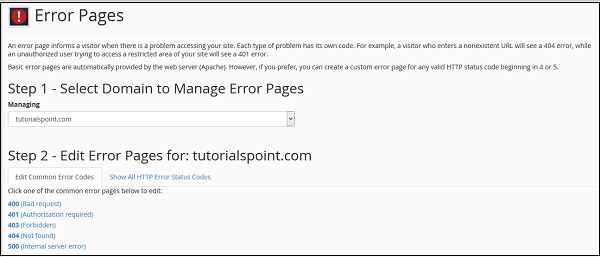 Step 3 − Select the error code of which you wish to edit the
error page. You can choose from the Common Error codes or you can click
All HTTP error codes to see the list of all error codes.
Step 3 − Select the error code of which you wish to edit the
error page. You can choose from the Common Error codes or you can click
All HTTP error codes to see the list of all error codes.
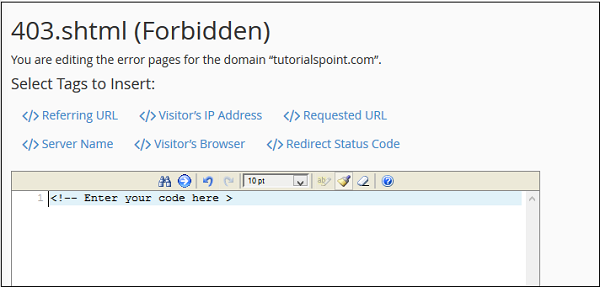 Step 4 − It will open an HTML editor for you in which you can
enter the HTML code for the error page you selected. You can also use
predefined tag in your code, click on the tag to insert it to the
editor.
Step 4 − It will open an HTML editor for you in which you can
enter the HTML code for the error page you selected. You can also use
predefined tag in your code, click on the tag to insert it to the
editor.
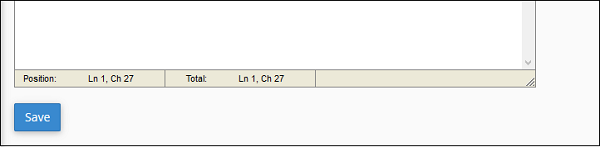 Step 5 − When finished inserting the code in the editor, Press
Save button to save the error page. Now each time your visitor will
encounter the error, he will be served your custom error page.
Step 5 − When finished inserting the code in the editor, Press
Save button to save the error page. Now each time your visitor will
encounter the error, he will be served your custom error page.
A Basic page contains the error code and error message only. You can customize this error page according to your choice. Each problem your webserver encounters has a unique error code; your webserver displays the error accordingly.
To modify an error page, follow these steps −
Step 1 − Open cPanel Error Pages interface by clicking on Error Pages link found in the advanced section of the cPanel Home.
Step 2 − In Error Pages interface, select the domain or
subdomain for which you want to configure the error pages from the drop
down menu.
Step 3 − Select the error code of which you wish to edit the
error page. You can choose from the Common Error codes or you can click
All HTTP error codes to see the list of all error codes.
Step 4 − It will open an HTML editor for you in which you can
enter the HTML code for the error page you selected. You can also use
predefined tag in your code, click on the tag to insert it to the
editor.
Step 5 − When finished inserting the code in the editor, Press
Save button to save the error page. Now each time your visitor will
encounter the error, he will be served your custom error page.

No comments:
Post a Comment