
cPanel Disk Usage is a very efficient way to monitor your accounts
available and use disk spaces. This feature scans your disk to provide
you a graphical overview of the Disk usage. It displays disk space used
by directories, but it does not show how much space is consumed by an
individual file.
It also displays information of disk quota used by MySQL Databases, hidden directories and Emails.
It helps in management of disk quota, because once you know which directory has the largest files, you can navigate to that directory using file manager and delete unnecessary files.
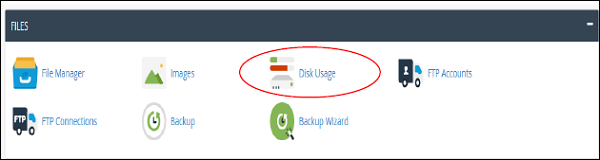
To access this feature, click Disk Usage link from Files section of cPanel.
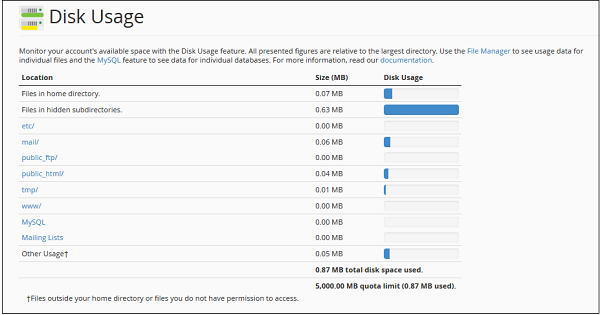
 cPanel Disk Manger has mainly two tables. The first table
gives you information about disk space used by subdirectories of home
directory and space used by other features like MySQL, Mailing Lists.
Please refer to screenshot below.
cPanel Disk Manger has mainly two tables. The first table
gives you information about disk space used by subdirectories of home
directory and space used by other features like MySQL, Mailing Lists.
Please refer to screenshot below.
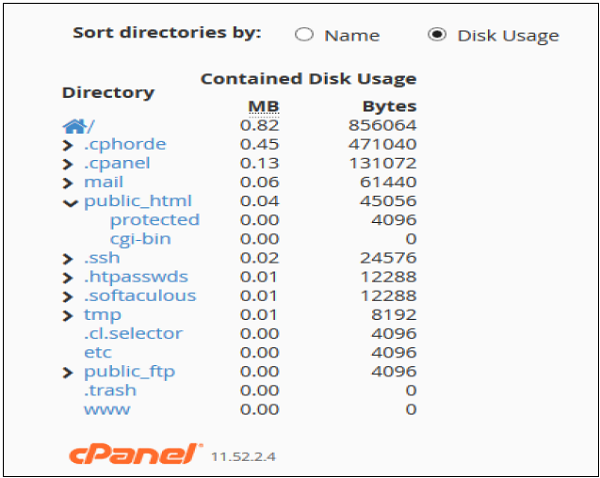
 The Second Table displays a directory structure, which has all
the subdirectories including hidden ones, to open a directory to view
space used by that sub-directory, you can click on the arrow shown in
front of the name of the directory. Clicking on the name of directory
will take you to the File Manager. In this table, you can see which
subdirectory has the largest files in them, it is very helpful when
there are lots of directories in your account.
The Second Table displays a directory structure, which has all
the subdirectories including hidden ones, to open a directory to view
space used by that sub-directory, you can click on the arrow shown in
front of the name of the directory. Clicking on the name of directory
will take you to the File Manager. In this table, you can see which
subdirectory has the largest files in them, it is very helpful when
there are lots of directories in your account.
It also displays information of disk quota used by MySQL Databases, hidden directories and Emails.
It helps in management of disk quota, because once you know which directory has the largest files, you can navigate to that directory using file manager and delete unnecessary files.
To access this feature, click Disk Usage link from Files section of cPanel.
cPanel Disk Manger has mainly two tables. The first table
gives you information about disk space used by subdirectories of home
directory and space used by other features like MySQL, Mailing Lists.
Please refer to screenshot below.
The Second Table displays a directory structure, which has all
the subdirectories including hidden ones, to open a directory to view
space used by that sub-directory, you can click on the arrow shown in
front of the name of the directory. Clicking on the name of directory
will take you to the File Manager. In this table, you can see which
subdirectory has the largest files in them, it is very helpful when
there are lots of directories in your account.

No comments:
Post a Comment