
The letter “V” in the MVC is for Views. Views are responsible for sending output to user based on request. View Classes is a powerful way to speed up the development process.
Template files are stored in src/Template/, in a directory named after the controller that uses the files, and named after the action it corresponds to. For example, the View file for the Products controller’s “view()” action, would normally be found in src/Template/Products/view.ctp.
In short, the name of the controller (ProductsController) is same as the name of the folder (Products) but without the word Controller and name of action/method (view()) of the controller (ProductsController) is same as the name of the View file(view.ctp).
config/routes.php
src/Controller/ProductsController.php
src/Template/Products/view.ctp
http://localhost:85/CakePHP/template
View Templates
The View Templates file of CakePHP has default extension .ctp (CakePHP Template). These templates get data from controller and then render the output so that it can be displayed properly to the user. We can use variables, various control structures in template.Template files are stored in src/Template/, in a directory named after the controller that uses the files, and named after the action it corresponds to. For example, the View file for the Products controller’s “view()” action, would normally be found in src/Template/Products/view.ctp.
In short, the name of the controller (ProductsController) is same as the name of the folder (Products) but without the word Controller and name of action/method (view()) of the controller (ProductsController) is same as the name of the View file(view.ctp).
View Variables
View variables are variables which get the value from controller. We can use as many variables in view templates as we want. We can use the set() method to pass values to variables in views. These set variables will be available in both the view and the layout your action renders. The following is the syntax of the set() method.Syntax
Cake\View\View::set(string $var, mixed $value)This method takes two arguments − the name of the variable and its value.
Example
Make Changes in the config/routes.php file as shown in the following program.config/routes.php
<?php
   use Cake\Core\Plugin;
   use Cake\Routing\RouteBuilder;
   use Cake\Routing\Router;

   Router::defaultRouteClass('DashedRoute');
   Router::scope('/', function (RouteBuilder $routes) {
      $routes->connect('template',['controller'=>'Products','action'=>'view']);
      $routes->fallbacks('DashedRoute');
   });
   Plugin::routes();
Create a ProductsController.php file at src/Controller/ProductsController.php. Copy the following code in the controller file.
src/Controller/ProductsController.php
<?php
   namespace App\Controller;
   use App\Controller\AppController;

   class ProductsController extends AppController{
      public function view(){
         $this->set('Product_Name','XYZ');
      }
   }
?>
Create a directory Products at src/Template and under that folder create a View file called view.ctp. Copy the following code in that file.
src/Template/Products/view.ctp
Value of variable is: <?php echo $Product_Name; ?>Execute the above example by visiting the following URL.
http://localhost:85/CakePHP/template
Output
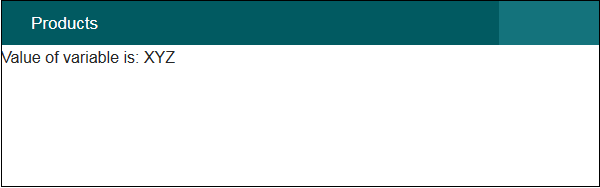
The above URL will produce the following output.

No comments:
Post a Comment