
In Visitor pattern, we use a visitor class which changes the
executing algorithm of an element class. By this way, execution
algorithm of element can vary as and when visitor varies. This pattern
comes under behavior pattern category. As per the pattern, element
object has to accept the visitor object so that visitor object handles
the operation on the element object.
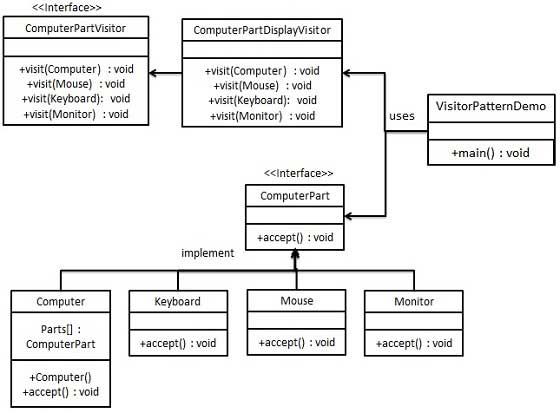
VisitorPatternDemo, our demo class, will use Computer and ComputerPartVisitor classes to demonstrate use of visitor pattern.
ComputerPart.java
Keyboard.java
ComputerPartVisitor.java
ComputerPartDisplayVisitor.java
VisitorPatternDemo.java
Implementation
We are going to create a ComputerPart interface defining accept opearation.Keyboard, Mouse, Monitor and Computer are concrete classes implementing ComputerPart interface. We will define another interface ComputerPartVisitor which will define a visitor class operations. Computer uses concrete visitor to do corresponding action.VisitorPatternDemo, our demo class, will use Computer and ComputerPartVisitor classes to demonstrate use of visitor pattern.
Step 1
Define an interface to represent element.ComputerPart.java
public interface ComputerPart {
   public void accept(ComputerPartVisitor computerPartVisitor);
}
Step 2
Create concrete classes extending the above class.Keyboard.java
public class Keyboard implements ComputerPart {

   @Override
   public void accept(ComputerPartVisitor computerPartVisitor) {
      computerPartVisitor.visit(this);
   }
}
Monitor.java
public class Monitor implements ComputerPart {

   @Override
   public void accept(ComputerPartVisitor computerPartVisitor) {
      computerPartVisitor.visit(this);
   }
}
Mouse.java
public class Mouse implements ComputerPart {

   @Override
   public void accept(ComputerPartVisitor computerPartVisitor) {
      computerPartVisitor.visit(this);
   }
}
Computer.java
public class Computer implements ComputerPart {

   ComputerPart[] parts;

   public Computer(){
      parts = new ComputerPart[] {new Mouse(), new Keyboard(), new Monitor()};
   }


   @Override
   public void accept(ComputerPartVisitor computerPartVisitor) {
      for (int i = 0; i < parts.length; i++) {
         parts[i].accept(computerPartVisitor);
      }
      computerPartVisitor.visit(this);
   }
}
Step 3
Define an interface to represent visitor.ComputerPartVisitor.java
public interface ComputerPartVisitor {
 public void visit(Computer computer);
 public void visit(Mouse mouse);
 public void visit(Keyboard keyboard);
 public void visit(Monitor monitor);
}
Step 4
Create concrete visitor implementing the above class.ComputerPartDisplayVisitor.java
public class ComputerPartDisplayVisitor implements ComputerPartVisitor {

   @Override
   public void visit(Computer computer) {
      System.out.println("Displaying Computer.");
   }

   @Override
   public void visit(Mouse mouse) {
      System.out.println("Displaying Mouse.");
   }

   @Override
   public void visit(Keyboard keyboard) {
      System.out.println("Displaying Keyboard.");
   }

   @Override
   public void visit(Monitor monitor) {
      System.out.println("Displaying Monitor.");
   }
}
Step 5
Use the ComputerPartDisplayVisitor to display parts of Computer.VisitorPatternDemo.java
public class VisitorPatternDemo {
   public static void main(String[] args) {

      ComputerPart computer = new Computer();
      computer.accept(new ComputerPartDisplayVisitor());
   }
}
Step 6
Verify the output.Displaying Mouse. Displaying Keyboard. Displaying Monitor. Displaying Computer.


No comments:
Post a Comment