
MVC Pattern stands for Model-View-Controller Pattern. This pattern is used to separate application's concerns.
MVCPatternDemo, our demo class, will use StudentController to demonstrate use of MVC pattern.
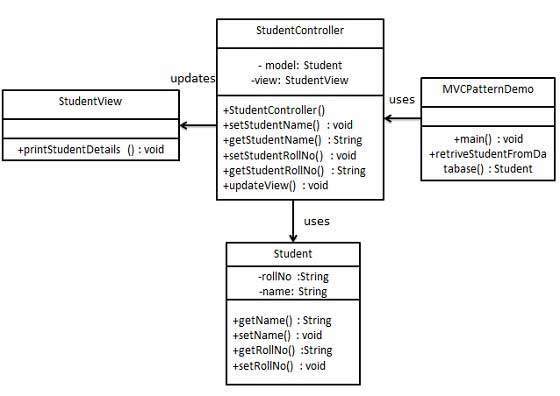
Student.java
StudentView.java
StudentController.java
MVCPatternDemo.java
- Model - Model represents an object or JAVA POJO carrying data. It can also have logic to update controller if its data changes.
- View - View represents the visualization of the data that model contains.
- Controller - Controller acts on both model and view. It controls the data flow into model object and updates the view whenever data changes. It keeps view and model separate.
Implementation
We are going to create a Student object acting as a model.StudentView will be a view class which can print student details on console and StudentController is the controller class responsible to store data in Student object and update view StudentView accordingly.MVCPatternDemo, our demo class, will use StudentController to demonstrate use of MVC pattern.
Step 1
Create Model.Student.java
public class Student {
   private String rollNo;
   private String name;

   public String getRollNo() {
      return rollNo;
   }

   public void setRollNo(String rollNo) {
      this.rollNo = rollNo;
   }

   public String getName() {
      return name;
   }

   public void setName(String name) {
      this.name = name;
   }
}
Step 2
Create View.StudentView.java
public class StudentView {
   public void printStudentDetails(String studentName, String studentRollNo){
      System.out.println("Student: ");
      System.out.println("Name: " + studentName);
      System.out.println("Roll No: " + studentRollNo);
   }
}
Step 3
Create Controller.StudentController.java
public class StudentController {
   private Student model;
   private StudentView view;

   public StudentController(Student model, StudentView view){
      this.model = model;
      this.view = view;
   }

   public void setStudentName(String name){
      model.setName(name);
   }

   public String getStudentName(){
      return model.getName();
   }

   public void setStudentRollNo(String rollNo){
      model.setRollNo(rollNo);
   }

   public String getStudentRollNo(){
      return model.getRollNo();
   }

   public void updateView(){
      view.printStudentDetails(model.getName(), model.getRollNo());
   }
}
Step 4
Use the StudentController methods to demonstrate MVC design pattern usage.MVCPatternDemo.java
public class MVCPatternDemo {
   public static void main(String[] args) {

      //fetch student record based on his roll no from the database
      Student model  = retriveStudentFromDatabase();

      //Create a view : to write student details on console
      StudentView view = new StudentView();

      StudentController controller = new StudentController(model, view);

      controller.updateView();

      //update model data
      controller.setStudentName("John");

      controller.updateView();
   }

   private static Student retriveStudentFromDatabase(){
      Student student = new Student();
      student.setName("Robert");
      student.setRollNo("10");
      return student;
   }
}
Step 5
Verify the output.Student: Name: Robert Roll No: 10 Student: Name: John Roll No: 10


No comments:
Post a Comment