
In State pattern a class behavior changes based on its state. This type of design pattern comes under behavior pattern.
In State pattern, we create objects which represent various states and a context object whose behavior varies as its state object changes.
StatePatternDemo, our demo class, will use Context and state objects to demonstrate change in Context behavior based on type of state it is in.
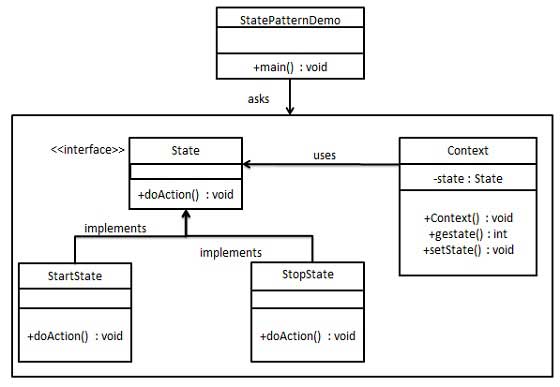
State.java
StartState.java
Context.java
StatePatternDemo.java
In State pattern, we create objects which represent various states and a context object whose behavior varies as its state object changes.
Implementation
We are going to create a State interface defining an action and concrete state classes implementing the State interface. Context is a class which carries a State.StatePatternDemo, our demo class, will use Context and state objects to demonstrate change in Context behavior based on type of state it is in.
Step 1
Create an interface.State.java
public interface State {
   public void doAction(Context context);
}
Step 2
Create concrete classes implementing the same interface.StartState.java
public class StartState implements State {

   public void doAction(Context context) {
      System.out.println("Player is in start state");
      context.setState(this);
   }

   public String toString(){
      return "Start State";
   }
}
StopState.java
public class StopState implements State {

   public void doAction(Context context) {
      System.out.println("Player is in stop state");
      context.setState(this);
   }

   public String toString(){
      return "Stop State";
   }
}
Step 3
Create Context Class.Context.java
public class Context {
   private State state;

   public Context(){
      state = null;
   }

   public void setState(State state){
      this.state = state;
   }

   public State getState(){
      return state;
   }
}
Step 4
Use the Context to see change in behaviour when State changes.StatePatternDemo.java
public class StatePatternDemo {
   public static void main(String[] args) {
      Context context = new Context();

      StartState startState = new StartState();
      startState.doAction(context);

      System.out.println(context.getState().toString());

      StopState stopState = new StopState();
      stopState.doAction(context);

      System.out.println(context.getState().toString());
   }
}
Step 5
Verify the output.Player is in start state Start State Player is in stop state Stop State


No comments:
Post a Comment