
Observer pattern is used when there is one-to-many relationship
between objects such as if one object is modified, its depenedent
objects are to be notified automatically. Observer pattern falls under
behavioral pattern category.
ObserverPatternDemo, our demo class, will use Subject and concrete class object to show observer pattern in action.
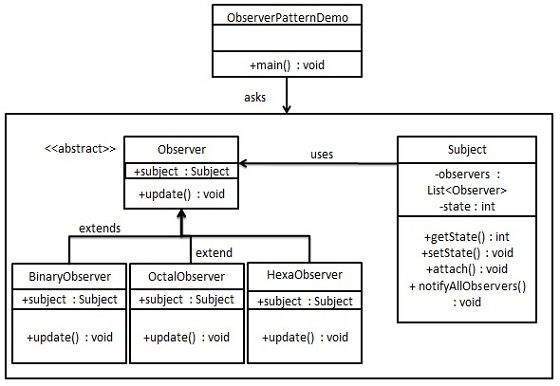
Subject.java
Observer.java
BinaryObserver.java
ObserverPatternDemo.java
Implementation
Observer pattern uses three actor classes. Subject, Observer and Client. Subject is an object having methods to attach and detach observers to a client object. We have created an abstract class Observer and a concrete class Subject that is extending class Observer.ObserverPatternDemo, our demo class, will use Subject and concrete class object to show observer pattern in action.
Step 1
Create Subject class.Subject.java
import java.util.ArrayList;
import java.util.List;

public class Subject {

   private List<Observer> observers = new ArrayList<Observer>();
   private int state;

   public int getState() {
      return state;
   }

   public void setState(int state) {
      this.state = state;
      notifyAllObservers();
   }

   public void attach(Observer observer){
      observers.add(observer);
   }

   public void notifyAllObservers(){
      for (Observer observer : observers) {
         observer.update();
      }
   }
}
Step 2
Create Observer class.Observer.java
public abstract class Observer {
   protected Subject subject;
   public abstract void update();
}
Step 3
Create concrete observer classesBinaryObserver.java
public class BinaryObserver extends Observer{

   public BinaryObserver(Subject subject){
      this.subject = subject;
      this.subject.attach(this);
   }

   @Override
   public void update() {
      System.out.println( "Binary String: " + Integer.toBinaryString( subject.getState() ) );
   }
}
OctalObserver.java
public class OctalObserver extends Observer{

   public OctalObserver(Subject subject){
      this.subject = subject;
      this.subject.attach(this);
   }

   @Override
   public void update() {
     System.out.println( "Octal String: " + Integer.toOctalString( subject.getState() ) );
   }
}
HexaObserver.java
public class HexaObserver extends Observer{

   public HexaObserver(Subject subject){
      this.subject = subject;
      this.subject.attach(this);
   }

   @Override
   public void update() {
      System.out.println( "Hex String: " + Integer.toHexString( subject.getState() ).toUpperCase() );
   }
}
Step 4
Use Subject and concrete observer objects.ObserverPatternDemo.java
public class ObserverPatternDemo {
   public static void main(String[] args) {
      Subject subject = new Subject();

      new HexaObserver(subject);
      new OctalObserver(subject);
      new BinaryObserver(subject);

      System.out.println("First state change: 15");
      subject.setState(15);
      System.out.println("Second state change: 10");
      subject.setState(10);
   }
}
Step 5
Verify the output.First state change: 15 Hex String: F Octal String: 17 Binary String: 1111 Second state change: 10 Hex String: A Octal String: 12 Binary String: 1010


No comments:
Post a Comment