
This chapter takes you through the process of applying different
formulas on cells using Java programming. The basic purpose of Excel
application is to maintain numerical data by applying formulas on it.
In a formula, we pass dynamic values or locations of the values in the Excel sheet. On executing this formula, you get the desired result. The following table lists a few basic formulas that are frequently used in Excel.
The following code is used to add formulas to a cell and execute it.
In a formula, we pass dynamic values or locations of the values in the Excel sheet. On executing this formula, you get the desired result. The following table lists a few basic formulas that are frequently used in Excel.
| Operation | Syntax |
|---|---|
| Adding multiple numbers | = SUM(Loc1:Locn) or = SUM(n1,n2,) |
| Count | = COUNT(Loc1:Locn) or = COUNT(n1,n2,) |
| Power of two numbers | = POWER(Loc1,Loc2) or = POWER(number, power) |
| Max of multiple numbers | = MAX(Loc1:Locn) or = MAX(n1,n2,) |
| Product | = PRODUCT(Loc1:Locn) or = PRODUCT(n1,n2,) |
| Factorial | = FACT(Locn) or = FACT(number) |
| Absolute number | = ABS(Locn) or = ABS(number) |
| Today date | =TODAY() |
| Converts lowercase | = LOWER(Locn) or = LOWER(text) |
| Square root | = SQRT(locn) or = SQRT(number) |
import java.io.File;
import java.io.FileOutputStream;
import org.apache.poi.xssf.usermodel.XSSFCell;
import org.apache.poi.xssf.usermodel.XSSFRow;
import org.apache.poi.xssf.usermodel.XSSFSheet;
import org.apache.poi.xssf.usermodel.XSSFWorkbook;
public class Formula
{
   public static void main(String[] args)throws Exception
   {
      XSSFWorkbook workbook = new XSSFWorkbook();
      XSSFSheet spreadsheet = workbook.createSheet("formula");
      XSSFRow row = spreadsheet.createRow(1);
      XSSFCell cell = row.createCell(1);
      cell.setCellValue("A =" );
      cell = row.createCell(2);
      cell.setCellValue(2);
      row = spreadsheet.createRow(2);
      cell = row.createCell(1);
      cell.setCellValue("B =");
      cell = row.createCell(2);
      cell.setCellValue(4);
      row = spreadsheet.createRow(3);
      cell = row.createCell(1);
      cell.setCellValue("Total =");
      cell = row.createCell(2);
      // Create SUM formula
      cell.setCellType(XSSFCell.CELL_TYPE_FORMULA);
      cell.setCellFormula("SUM(C2:C3)" );
      cell = row.createCell(3);
      cell.setCellValue("SUM(C2:C3)");
      row = spreadsheet.createRow(4);
      cell = row.createCell(1);
      cell.setCellValue("POWER =");
      cell=row.createCell(2);
      // Create POWER formula
      cell.setCellType(XSSFCell.CELL_TYPE_FORMULA);
      cell.setCellFormula("POWER(C2,C3)");
      cell = row.createCell(3);
      cell.setCellValue("POWER(C2,C3)");
      row = spreadsheet.createRow(5);
      cell = row.createCell(1);
      cell.setCellValue("MAX =");
      cell = row.createCell(2);
      // Create MAX formula
      cell.setCellType(XSSFCell.CELL_TYPE_FORMULA);
      cell.setCellFormula("MAX(C2,C3)");
      cell = row.createCell(3);
      cell.setCellValue("MAX(C2,C3)");
      row = spreadsheet.createRow(6);
      cell = row.createCell(1);
      cell.setCellValue("FACT =");
      cell = row.createCell(2);
      // Create FACT formula
      cell.setCellType(XSSFCell.CELL_TYPE_FORMULA);
      cell.setCellFormula("FACT(C3)");
      cell = row.createCell(3);
      cell.setCellValue("FACT(C3)");
      row = spreadsheet.createRow(7);
      cell = row.createCell(1);
      cell.setCellValue("SQRT =");
      cell = row.createCell(2);
      // Create SQRT formula
      cell.setCellType(XSSFCell.CELL_TYPE_FORMULA);
      cell.setCellFormula("SQRT(C5)");
      cell = row.createCell(3);
      cell.setCellValue("SQRT(C5)");
      workbook.getCreationHelper()
      .createFormulaEvaluator()
      .evaluateAll();
      FileOutputStream out = new FileOutputStream(
      new File("formula.xlsx"));
      workbook.write(out);
      out.close();
      System.out.println("fromula.xlsx written successfully");
   }
}
Save the above code as Formula.java and then compile and execute it from the command prompt as follows.
$javac Formula.java
$java Formula
It will generate an Excel file named formula.xlsx in your current directory and display the following output on the command prompt.
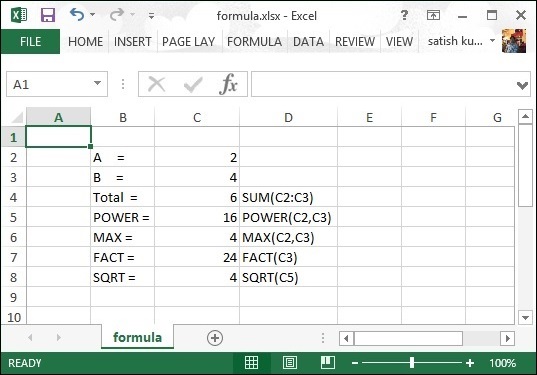
fromula.xlsx written successfullyThe formula.xlsx file looks as follows.


No comments:
Post a Comment