
This chapter explains how to add hyperlinks to the contents in a
cell. Usually hyperlinks are used to access any web URL, email, or an
external file.
The following code shows how to create hyperlinks on cells.
The following code shows how to create hyperlinks on cells.
import java.io.File;
import java.io.FileOutputStream;
import org.apache.poi.common.usermodel.Hyperlink;
import org.apache.poi.hssf.util.HSSFColor;
import org.apache.poi.ss.usermodel.CreationHelper;
import org.apache.poi.xssf.usermodel.XSSFCell;
import org.apache.poi.xssf.usermodel.XSSFCellStyle;
import org.apache.poi.xssf.usermodel.XSSFFont;
import org.apache.poi.xssf.usermodel.XSSFHyperlink;
import org.apache.poi.xssf.usermodel.XSSFSheet;
import org.apache.poi.xssf.usermodel.XSSFWorkbook;
public class HyperlinkEX
{
   public static void main(String[] args) throws Exception
   {
      XSSFWorkbook workbook = new XSSFWorkbook();
      XSSFSheet spreadsheet = workbook
      .createSheet("Hyperlinks");
      XSSFCell cell;
      CreationHelper createHelper = workbook
      .getCreationHelper();
      XSSFCellStyle hlinkstyle = workbook.createCellStyle();
      XSSFFont hlinkfont = workbook.createFont();
      hlinkfont.setUnderline(XSSFFont.U_SINGLE);
      hlinkfont.setColor(HSSFColor.BLUE.index);
      hlinkstyle.setFont(hlinkfont);
      //URL Link
      cell = spreadsheet.createRow(1)
      .createCell((short) 1);
      cell.setCellValue("URL Link");
      XSSFHyperlink link = (XSSFHyperlink)createHelper
      .createHyperlink(Hyperlink.LINK_URL);
      link.setAddress("http://www.tutorialspoint.com/" );
      cell.setHyperlink((XSSFHyperlink) link);
      cell.setCellStyle(hlinkstyle);
      //Hyperlink to a file in the current directory
      cell = spreadsheet.createRow(2)
      .createCell((short) 1);
      cell.setCellValue("File Link");
      link = (XSSFHyperlink)createHelper
      .createHyperlink(Hyperlink.LINK_FILE);
      link.setAddress("cellstyle.xlsx");
      cell.setHyperlink(link);
      cell.setCellStyle(hlinkstyle);
      //e-mail link
      cell = spreadsheet.createRow(3)
      .createCell((short) 1);
      cell.setCellValue("Email Link");
      link = (XSSFHyperlink)createHelper
      .createHyperlink(Hyperlink.LINK_EMAIL);
      link.setAddress(
      "mailto:contact@tutorialspoint.com?"
      +"subject=Hyperlink");
      cell.setHyperlink(link);
      cell.setCellStyle(hlinkstyle);
      FileOutputStream out = new FileOutputStream(
      new File("hyperlink.xlsx"));
      workbook.write(out);
      out.close();
      System.out.println("hyperlink.xlsx written successfully");
   }
}
Save the above code as HyperlinkEX.java. Compile and execute it from the command prompt as follows.
$javac HyperlinkEX.java
$java HyperlinkEX
It will generate an Excel file named hyperlink.xlsx in your current directory and display the following output on the command prompt.
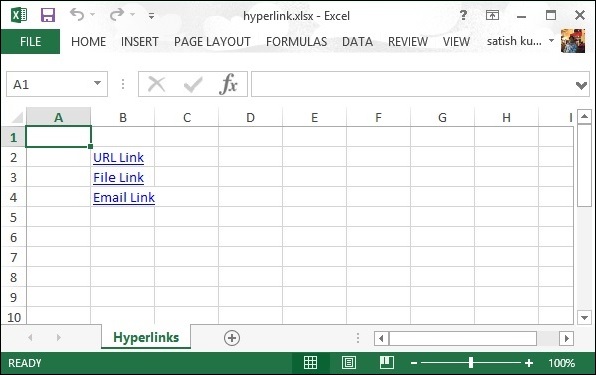
hyperlink.xlsx written successfullyThe hyperlink.xlsx file looks as follows.


No comments:
Post a Comment