
Paned class is the base class for widgets which can display two
adjustable panes either horizontally (gtk.Hpaned) or vertically
(gtk.Vpaned). Child widgets to panes are added by using pack1() and
pack2() methods.
Paned widget draws a separator slider between two panes and provides a handle to adjust their relative width/height. If the resize property of child widget inside a pane is set to True, it will resize according to the size of the panes.
The following methods are available for HPaned as well as VPaned class −
Observe the code −
Paned widget draws a separator slider between two panes and provides a handle to adjust their relative width/height. If the resize property of child widget inside a pane is set to True, it will resize according to the size of the panes.
The following methods are available for HPaned as well as VPaned class −
- Paned.add1(child) − This adds the widget specified by child to the top or left pane
- Paned.add2(child) − This adds the widget specified by child to the bottom or right pane.
- Paned.pack1(child, resize, shrink) − This adds the widget specified by child to the top or left pane with the parameters. If resize is True, child should be resized when the paned widget is resized. If shrink is True, child can be made smaller than its minimum size request.
- Paned.pack2(child, resize, shrink) − This sets the position of the divider between the two panes.
| accept-position | This is emitted when paned has the focus causing the child widget with the focus to be activated. |
| cancel-position | This is emitted when the Esc key is pressed while paned has the focus. |
| move-handle | This is emitted when paned has the focus and the separator is moved. |
Example
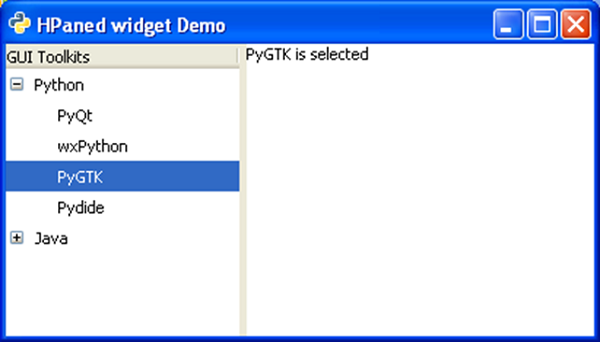
The following example uses a gtk.Hpaned widget. In the left pane, a TreeView widget is added, and in the right pane, there is a TextView widget. When any row in TreeView is selected, it will emit row_activated signal which is connected to a callback function. The on_activated()function retrieves row's text and displays in the text view panel.Observe the code −
import gtk, gobject
class PyApp(gtk.Window):
   def __init__(self):
      super(PyApp, self).__init__()
      self.set_title("HPaned widget Demo")
      self.set_default_size(250, 200)
      vp = gtk.HPaned()
      sw = gtk.ScrolledWindow()
      sw.set_policy(gtk.POLICY_AUTOMATIC, gtk.POLICY_AUTOMATIC)

      tree = gtk.TreeView()
      languages = gtk.TreeViewColumn()
      languages.set_title("GUI Toolkits")
      cell = gtk.CellRendererText()
      languages.pack_start(cell, True)
      languages.add_attribute(cell, "text", 0)
      treestore = gtk.TreeStore(str)
      it = treestore.append(None, ["Python"])

      treestore.append(it, ["PyQt"])
      treestore.append(it, ["wxPython"])
      treestore.append(it, ["PyGTK"])
      treestore.append(it, ["Pydide"])

      it = treestore.append(None, ["Java"])
      treestore.append(it, ["AWT"])
      treestore.append(it, ["Swing"])
      treestore.append(it, ["JSF"])
      treestore.append(it, ["SWT"])

      tree.append_column(languages)
      tree.set_model(treestore)

      vp.add1(tree)
      self.tv = gtk.TextView()
      vp.add2(self.tv)
      vp.set_position(100)
      self.add(vp)

      tree.connect("row-activated", self.on_activated)
      self.connect("destroy", gtk.main_quit)
      self.show_all()

   def on_activated(self, widget, row, col):
      model = widget.get_model()
      text = model[row][0]
      print text

      buffer = gtk.TextBuffer()
      buffer.set_text(text+" is selected")
      self.tv.set_buffer(buffer)
      if __name__ == '__main__':
PyApp()
gtk.main()
The above code will generate the following output −


No comments:
Post a Comment