
A notification area, usually at the bottom of a window is called the
status bar. Any type of status change message can be displayed on the
status bar. It also has a grip using which it can be resized.
The gtk.Statusbar widget maintains a stack of messages. Hence, new message gets displayed on top of the current message. If it is popped, earlier message will be visible again. Source of the message must be identified by context_id to identify it uniquely.
The following is the constructor of the gtk.Statusbar widget −
The following example demonstrates the functioning of Statusbar.
Toplevel window contains a VBox with two rows. Upper row has a Fixed
widget in which a label, an Entry widget and a button is put. Whereas,
in the bottom row, a gtk.Statusbar widget is added.
In order to send message to status bar, its context_id needs to be fetched.
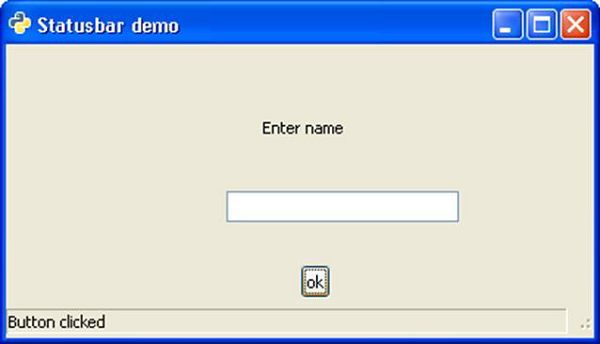 Try typing in the text box and press Enter to see the 'text entered' message in status bar.
The gtk.Statusbar widget maintains a stack of messages. Hence, new message gets displayed on top of the current message. If it is popped, earlier message will be visible again. Source of the message must be identified by context_id to identify it uniquely.
The following is the constructor of the gtk.Statusbar widget −
bar = gtk.Statusbar()The following are the methods of the gtk.Statusbar class −
- Statusbar.push(context_id, text) − This pushes a new message onto a statusbar's stack.
- Statusbar.pop(context_id) − This removes the top message with the specified context_id from the statusbar's stack.
| text-popped | This is emitted when a message is removed from the statusbar message stack. |
| text-pushed | This is emitted when a message is added to the statusbar message stack. |
In order to send message to status bar, its context_id needs to be fetched.
id1 = self.bar.get_context_id("Statusbar")
The 'clicked' signal of the Button object is connected to a callback
function through which a message is pushed in the status bar. And, the
'activate' signal is emitted when Enter key is pressed inside the Entry
widget. This widget is connected to another callback.btn.connect("clicked", self.on_clicked, id1)
txt.connect("activate", self.on_entered, id1)
Both callbacks use push() method to flash the message in the notification area.Example
Observe the following code −import gtk class PyApp(gtk.Window): def __init__(self): super(PyApp, self).__init__() self.set_title("Statusbar demo") self.set_size_request(400,200) self.set_position(gtk.WIN_POS_CENTER) vbox = gtk.VBox() fix = gtk.Fixed() lbl = gtk.Label("Enter name") fix.put(lbl, 175, 50) txt = gtk.Entry() fix.put(txt, 150, 100) btn = gtk.Button("ok") fix.put(btn, 200,150) vbox.add(fix) self.bar = gtk.Statusbar() vbox.pack_start(self.bar, True, False, 0) id1 = self.bar.get_context_id("Statusbar") btn.connect("clicked", self.on_clicked, id1) txt.connect("activate", self.on_entered, id1) self.add(vbox) self.connect("destroy", gtk.main_quit) self.show_all() def on_clicked(self, widget, data=None): self.bar.push(data, "Button clicked def on_entered(self, widget, data): self.bar.push(data, "text entered") PyApp() gtk.main()Upon execution, the above code will display the following output −
Try typing in the text box and press Enter to see the 'text entered' message in status bar.

No comments:
Post a Comment