
The gtk.Arrow object is used to draw simple arrow pointing towards four cardinal directions. This class is inherited from the gtk.Misc class and the object will occupy any space allocated it, for instance, a Label or Button widget.
Typically, Arrow object is created using the following constructor −
Observe the code −
Typically, Arrow object is created using the following constructor −
Arr = gtk.Arrow(arrow_type, shadow_type)The predefined arrow_type constants are −
- gtk.ARROW_UP
- gtk.ARROW_DOWN
- gtk.ARROW_LEFT
- gtk.ARROW_RIGHT
| gtk.SHADOW_NONE | No outline. |
| gtk.SHADOW_IN | The outline is beveled inward. |
| gtk.SHADOW_OUT | The outline is beveled outward like a button. |
| gtk.SHADOW_ETCHED_IN | The outline itself is an inward bevel, but the frame bevels outward. |
| gtk.SHADOW_ETCHED_OUT | The outline is an outward bevel, frame bevels inward. |
Example
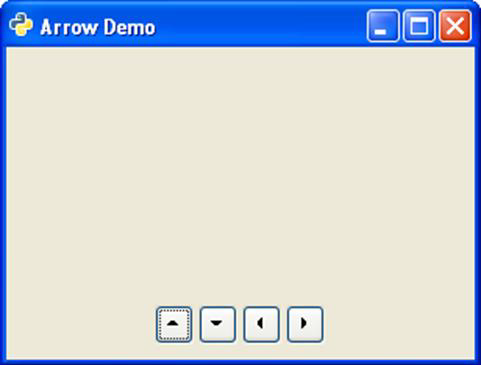
In the following example, four Button widgets are added to an Hbox. On top of each button, a gtk.Arrow object pointing UP, DOWN, LEFT and RIGHT respectively is placed. The HBOX container is placed at the bottom of the toplevel window with the help of an Alignment container.Observe the code −
import gtk
class PyApp(gtk.Window):
   def __init__(self):
      super(PyApp, self).__init__()
      self.set_title("Arrow Demo")
      self.set_size_request(300, 200)
      self.set_position(gtk.WIN_POS_CENTER)

      vbox = gtk.VBox(False, 5)
      hbox = gtk.HBox(True, 3)
      valign = gtk.Alignment(0, 1, 0, 0)
      vbox.pack_start(valign)

      arr1 = gtk.Arrow(gtk.ARROW_UP, gtk.SHADOW_NONE)
      arr2 = gtk.Arrow(gtk.ARROW_DOWN, gtk.SHADOW_NONE)
      arr3 = gtk.Arrow(gtk.ARROW_LEFT, gtk.SHADOW_NONE)
      arr4 = gtk.Arrow(gtk.ARROW_RIGHT, gtk.SHADOW_NONE)

      btn1 = gtk.Button()
      btn1.add(arr1)
      btn2 = gtk.Button()
      btn2.add(arr2)
      btn3 = gtk.Button()
      btn3.add(arr3)
      btn4 = gtk.Button()
      btn4.add(arr4)

      hbox.add(btn1)
      hbox.add(btn2)
      hbox.add(btn3)
      hbox.add(btn4)

      halign = gtk.Alignment(0.5, 0.5, 0, 0)
      halign.add(hbox)

      vbox.pack_start(halign, False, True, 10)
      self.add(vbox)
      self.connect("destroy", gtk.main_quit)
      self.show_all()
PyApp()
gtk.main()
The above code will generate the following output −


No comments:
Post a Comment