
Scrolled window is created to access other widget of area larger than
parent window. Some widgets like TreeView and TextView of native
support for scrolling. For others such as Label or Table, a Viewport
should be provided.
The following syntax is used for the constructor of the gtk.ScrolledWindow class −
The following syntax is used for the constructor of the gtk.ScrolledWindow class −
sw = gtk.ScrolledWindow(hadj, vadj)The following are the methods of the gtk.ScrolledWindow class −
- ScrolledWindow.set_hadjustment() − This sets the horizontal adjustment to a gtk.Adjustment object
- ScrolledWindow.set_vadjustment() − This sets the vertical adjustment to a gtk.Adjustment object
- ScrolledWindow.set_Policy (hpolicy, vpolicy) − This sets the "hscrollbar_policy" and "vscrollbar_policy" properties. One of the following predefined constants are used −
- gtk.POLICY_ALWAYS − The scrollbar is always present
- gtk.POLICY_AUTOMATIC − The scrollbar is present only if needed i.e. the contents are larget than the window
- gtk.POLICY_NEVER − The scrollbar is never present
- ScrolledWindow.add_with_viewport(child) − This method is used to add a widget (specified by child) without native scrolling capabilities to the scrolled window. This is a convenience function that is equivalent to adding child to a gtk.Viewport, then adding the viewport to the scrolled window.
sw = gtk.ScrolledWindow()
table = gtk.Table(10,10)
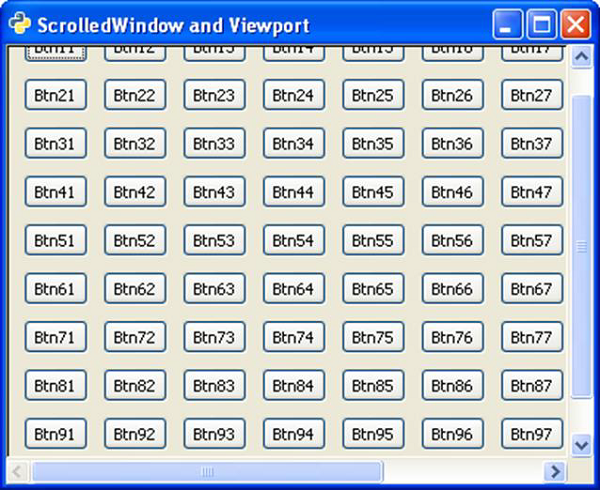
Two nested loops are used to add 10 rows of 10 columns each. A gtk.Button widget is placed in each cell.
for i in range(1,11):
   for j in range(1,11):
   caption = "Btn"+str(j)+str(i)
   btn = gtk.Button(caption)
   table.attach(btn, i, i+1, j, j+1)
This large enough table is now added in the scrolled window along with a viewport.
sw.add_with_viewport(table)
Example
Observe the following code −gtk class PyApp(gtk.Window): def __init__(self): super(PyApp, self).__init__() self.set_title("ScrolledWindow and Viewport") self.set_size_request(400,300) self.set_position(gtk.WIN_POS_CENTER) sw = gtk.ScrolledWindow() table = gtk.Table(10,10) table.set_row_spacings(10) table.set_col_spacings(10) for i in range(1,11): for j in range(1,11): caption = "Btn"+str(j)+str(i) btn = gtk.Button(caption) table.attach(btn, i, i+1, j, j+1) sw.add_with_viewport(table) self.add(sw) self.connect("destroy", gtk.main_quit) self.show_all() PyApp() gtk.main()The above code will generate the following output −


No comments:
Post a Comment