
Django comes with a syndication feed generating framework. With it you can create RSS or Atom feeds just by subclassing django.contrib.syndication.views.Feed class.
Let's create a feed for the latest comments done on the app (Also see Django - Comments Framework chapter).
For this, let's create a myapp/feeds.py and define our feed (You can put your feeds classes anywhere you want in your code structure).
 Then clicking on one of the usernames will get you to:
/myapp/comment/comment_id as defined in our comment view before and you
will get −
Then clicking on one of the usernames will get you to:
/myapp/comment/comment_id as defined in our comment view before and you
will get −
 Thus, defining a RSS feed is just a matter of sub-classing the Feed
class and making sure the URLs (one for accessing the feed and one for
accessing the feed elements) are defined. Just as comment, this can be
attached to any model in your app.
Thus, defining a RSS feed is just a matter of sub-classing the Feed
class and making sure the URLs (one for accessing the feed and one for
accessing the feed elements) are defined. Just as comment, this can be
attached to any model in your app.
Let's create a feed for the latest comments done on the app (Also see Django - Comments Framework chapter).
For this, let's create a myapp/feeds.py and define our feed (You can put your feeds classes anywhere you want in your code structure).
from django.contrib.syndication.views import Feed
from django.contrib.comments import Comment
from django.core.urlresolvers import reverse

class DreamrealCommentsFeed(Feed):
   title = "Dreamreal's comments"
   link = "/drcomments/"
   description = "Updates on new comments on Dreamreal entry."

   def items(self):
      return Comment.objects.all().order_by("-submit_date")[:5]

   def item_title(self, item):
      return item.user_name

   def item_description(self, item):
      return item.comment

   def item_link(self, item):
      return reverse('comment', kwargs = {'object_pk':item.pk})
- In our feed class, title, link, and description attributes correspond to the standard RSS <title>, <link> and <description> elements.
- The items method, return the elements that should go in the feed as item element. In our case the last five comments.
- The item_title method, will get what will go as title for our feed item. In our case the title, will be the user name.
- The item_description method, will get what will go as description for our feed item. In our case the comment itself.
- The item_link method will build the link to the full item. In our case it will get you to the comment.
from django.contrib.comments import Comment

def comment(request, object_pk):
   mycomment = Comment.objects.get(object_pk = object_pk)
   text = '<strong>User :</strong> %s <p>'%mycomment.user_name</p>
   text += '<strong>Comment :</strong> %s <p>'%mycomment.comment</p>
   return HttpResponse(text)
We also need some URLs in our myapp urls.py for mapping −
from myapp.feeds import DreamrealCommentsFeed
from django.conf.urls import patterns, url

urlpatterns += patterns('',
   url(r'^latest/comments/', DreamrealCommentsFeed()),
   url(r'^comment/(?P\w+)/', 'comment', name = 'comment'),
)
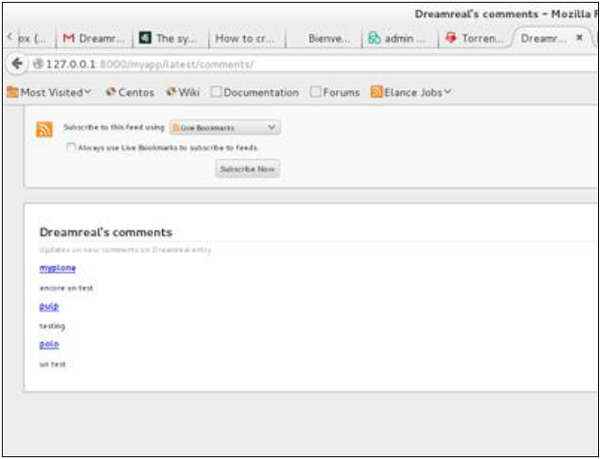
When accessing /myapp/latest/comments/ you will get our feed −
Then clicking on one of the usernames will get you to:
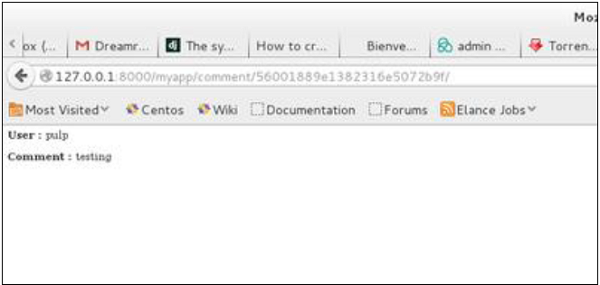
/myapp/comment/comment_id as defined in our comment view before and you
will get −
Thus, defining a RSS feed is just a matter of sub-classing the Feed
class and making sure the URLs (one for accessing the feed and one for
accessing the feed elements) are defined. Just as comment, this can be
attached to any model in your app.

No comments:
Post a Comment