
Page redirection is needed for many reasons in web application. You
might want to redirect a user to another page when a specific action
occurs, or basically in case of error. For example, when a user logs in
to your website, he is often redirected either to the main home page or
to his personal dashboard.
In Django, redirection is accomplished using the 'redirect' method.
The 'redirect' method takes as argument: The URL you want to be redirected to as string A view's name.
The myapp/views looks like the following so far −
Accessing /myapp/hello, will give you the following screen −
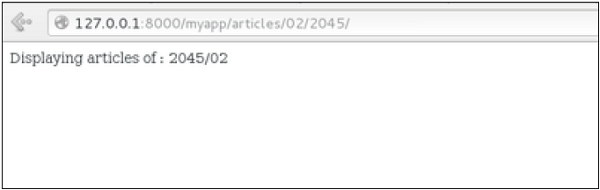
 And accessing /myapp/article/42, will give you the following screen −
 It is also possible to specify whether the 'redirect' is temporary or
permanent by adding permanent = True parameter. The user will see no
difference, but these are details that search engines take into account
when ranking of your website.
It is also possible to specify whether the 'redirect' is temporary or
permanent by adding permanent = True parameter. The user will see no
difference, but these are details that search engines take into account
when ranking of your website.
Also remember that 'name' parameter we defined in our url.py while mapping the URLs −
In Django, redirection is accomplished using the 'redirect' method.
The 'redirect' method takes as argument: The URL you want to be redirected to as string A view's name.
The myapp/views looks like the following so far −
def hello(request):
   today = datetime.datetime.now().date()
   daysOfWeek = ['Mon', 'Tue', 'Wed', 'Thu', 'Fri', 'Sat', 'Sun']
   return render(request, "hello.html", {"today" : today, "days_of_week" : daysOfWeek})

def viewArticle(request, articleId):
   """ A view that display an article based on his ID"""
   text = "Displaying article Number : %s" %articleId
   return HttpResponse(text)

def viewArticles(request, year, month):
   text = "Displaying articles of : %s/%s"%(year, month)
   return HttpResponse(text)
Let's change the hello view to redirect to djangoproject.com and our viewArticle to redirect to our internal '/myapp/articles'. To do so the myapp/view.py will change to −
from django.shortcuts import render, redirect
from django.http import HttpResponse
import datetime

# Create your views here.
def hello(request):
   today = datetime.datetime.now().date()
   daysOfWeek = ['Mon', 'Tue', 'Wed', 'Thu', 'Fri', 'Sat', 'Sun']
   return redirect("https://www.djangoproject.com")

def viewArticle(request, articleId):
   """ A view that display an article based on his ID"""
   text = "Displaying article Number : %s" %articleId
   return redirect(viewArticles, year = "2045", month = "02")

def viewArticles(request, year, month):
   text = "Displaying articles of : %s/%s"%(year, month)
   return HttpResponse(text)
In the above example, first we imported redirect from django.shortcuts and for redirection to the Django official website we just pass the full URL to the 'redirect' method as string, and for the second example (the viewArticle view) the 'redirect' method takes the view name and his parameters as arguments.
Accessing /myapp/hello, will give you the following screen −
And accessing /myapp/article/42, will give you the following screen −
It is also possible to specify whether the 'redirect' is temporary or
permanent by adding permanent = True parameter. The user will see no
difference, but these are details that search engines take into account
when ranking of your website.Also remember that 'name' parameter we defined in our url.py while mapping the URLs −
url(r'^articles/(?P\d{2})/(?P\d{4})/', 'viewArticles', name = 'articles'),
That name (here article) can be used as argument for the 'redirect'
method, then our viewArticle redirection can be changed from −def viewArticle(request, articleId): """ A view that display an article based on his ID""" text = "Displaying article Number : %s" %articleId return redirect(viewArticles, year = "2045", month = "02")To −
def viewArticle(request, articleId):
   """ A view that display an article based on his ID"""
   text = "Displaying article Number : %s" %articleId
   return redirect(articles, year = "2045", month = "02")
Note − There is also a function to generate URLs; it is used in the same way as redirect; the 'reverse' method (django.core.urlresolvers.reverse). This function does not return a HttpResponseRedirect object, but simply a string containing the URL to the view compiled with any passed argument.


No comments:
Post a Comment