
Sometimes you might want to store some data on a per-site-visitor
basis as per the requirements of your web application. Always keep in
mind, that cookies are saved on the client side and depending on your
client browser security level, setting cookies can at times work and at
times might not.
To illustrate cookies handling in Django, let's create a system using the login system we created before. The system will keep you logged in for X minute of time, and beyond that time, you will be out of the app.
For this, you will need to set up two cookies, last_connection and username.
At first, let's change our login view to store our username and last_connection cookies −
Let’s now create a formView for the login form, where we won’t display the form if cookie is set and is not older than 10 second −
Now let’s change the url.py file to change the URL so it pairs with our new view −
 And you will get redirected to the following screen on submit −
 Now, if you try to access /myapp/connection again in the 10 seconds
range, you will get redirected to the second screen directly. And if you
access /myapp/connection again out of this range you will get the login
form (screen 1).
Now, if you try to access /myapp/connection again in the 10 seconds
range, you will get redirected to the second screen directly. And if you
access /myapp/connection again out of this range you will get the login
form (screen 1).
To illustrate cookies handling in Django, let's create a system using the login system we created before. The system will keep you logged in for X minute of time, and beyond that time, you will be out of the app.
For this, you will need to set up two cookies, last_connection and username.
At first, let's change our login view to store our username and last_connection cookies −
from django.template import RequestContext

def login(request):
   username = "not logged in"

   if request.method == "POST":
      #Get the posted form
      MyLoginForm = LoginForm(request.POST)

   if MyLoginForm.is_valid():
      username = MyLoginForm.cleaned_data['username']
   else:
      MyLoginForm = LoginForm()

   response = render_to_response(request, 'loggedin.html', {"username" : username},
      context_instance = RequestContext(request))

   response.set_cookie('last_connection', datetime.datetime.now())
   response.set_cookie('username', datetime.datetime.now())

   return response
As seen in the view above, setting cookie is done by the set_cookie method called on the response not the request, and also note that all cookies values are returned as string.
Let’s now create a formView for the login form, where we won’t display the form if cookie is set and is not older than 10 second −
def formView(request):
   if 'username' in request.COOKIES and 'last_connection' in request.COOKIES:
      username = request.COOKIES['username']

      last_connection = request.COOKIES['last_connection']
      last_connection_time = datetime.datetime.strptime(last_connection[:-7],
         "%Y-%m-%d %H:%M:%S")

      if (datetime.datetime.now() - last_connection_time).seconds < 10:
         return render(request, 'loggedin.html', {"username" : username})
      else:
         return render(request, 'login.html', {})

   else:
      return render(request, 'login.html', {})
As you can see in the formView above accessing the cookie you set, is done via the COOKIES attribute (dict) of the request.
Now let’s change the url.py file to change the URL so it pairs with our new view −
from django.conf.urls import patterns, url
from django.views.generic import TemplateView

urlpatterns = patterns('myapp.views',
   url(r'^connection/','formView', name = 'loginform'),
   url(r'^login/', 'login', name = 'login'))
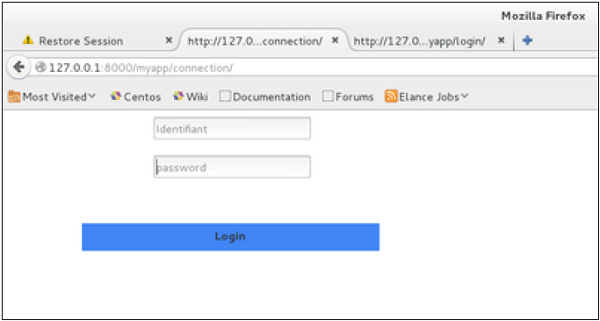
When accessing /myapp/connection, you will get the following page −
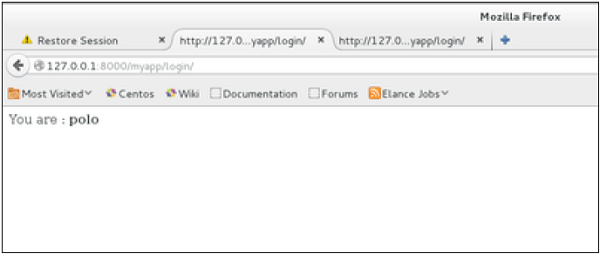
And you will get redirected to the following screen on submit −
Now, if you try to access /myapp/connection again in the 10 seconds
range, you will get redirected to the second screen directly. And if you
access /myapp/connection again out of this range you will get the login
form (screen 1).

No comments:
Post a Comment