
All files and directories in Linux Operating System has access
permissions. This feature gives the ability to the user for setting up
different access levels for each user and also Operating system gets the
ability to deal with different request for accessing the file. This
feature makes system more secure to potential security threats. There
are three types of access permissions −
These access permissions are given to three types of users −
You can change the file permissions in cPanel environment by using the following steps −
Step 1 − Go to File Manager from cPanel Home.
Step 2 − Navigate to the File or Folder you wish to change permissions to and select the file or folder by a single click of the mouse.
Step 3 − Click on Permissions link from the Top menu of File Manager and you will get a Prompt as shown below.
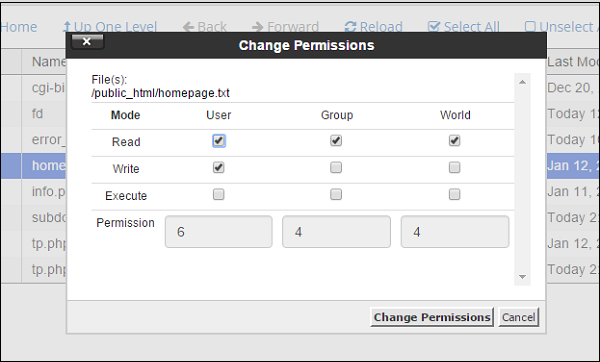 Step 4 − Choose permissions according to your need and Click on Change Permissions to save the new access permissions of the file.
- Read − It is denoted by ‘r’ and number 4, it gives ability to the user for reading the file only.
- Write − It is denoted by ‘w’ and number 2, it gives ability to the user for writing into the file only.
- Execute − It is denoted by ‘x’ and number 1, it gives ability to user for executing the file only.
These access permissions are given to three types of users −
- User − It is owner of the file.
- Group − It is the group of users in which Owner lies.
- World − It is referred to everyone else.
You can change the file permissions in cPanel environment by using the following steps −
Step 1 − Go to File Manager from cPanel Home.
Step 2 − Navigate to the File or Folder you wish to change permissions to and select the file or folder by a single click of the mouse.
Step 3 − Click on Permissions link from the Top menu of File Manager and you will get a Prompt as shown below.
Step 4 − Choose permissions according to your need and Click on Change Permissions to save the new access permissions of the file.

No comments:
Post a Comment