
Email Authentications prevent the email from going into the spam
folder of recipients. cPanel uses DKIM and SPF to reduce the amount of
spam mails. Enabling these features will prevent spammers from forging
messages that claims to be coming from your domain.
When DKIM is enabled, the sender signs the email with a digital signature using a private key. When the email approaches the recipient, it retrieves the public key of its sender and checks if the signature matches. If the signature is invalid, then message is treated as a spam message.
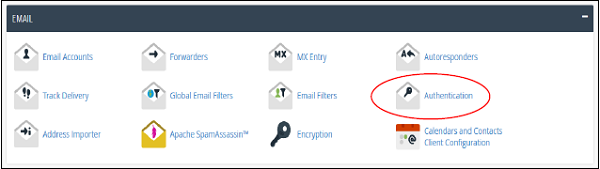
Step 1 − Open Email Authentication by clicking Authentication found under Mail Section of cPanel Home.
 Step 2 − Find DKIM settings, if disabled then, click Enable button to Enable DKIM.

Step 1 − Open Email Authentication by clicking Authentication found under Mail Section of cPanel Home.
Step 2 − Find DKIM setting, if enabled, then click Disable button to Disable DKIM.
 Note − To Enable DKIM, your Nameservers must point to your
hosting. It is recommended that you use DKIM Authentication in your
hosting.
Note − To Enable DKIM, your Nameservers must point to your
hosting. It is recommended that you use DKIM Authentication in your
hosting.
Step 1 − Open Email Authentication by clicking Authentication found under Mail Section of cPanel Home.
Step 2 − Find SPF setting, if disabled, then click Enable button to Enable SPF.

Step 1 − Open Email Authentication by clicking Authentication found under Mail Section of cPanel Home.
Step 2 − Find SPF setting, if enabled, then click Disable button to disable SPF.

DKIM
Domain Key Identification Mechanism (DKIM) verifies your incoming emails to check whether they are same as they were before when they were sent. This means, if they are altered during the transit. It also checks whether they are from the same address, whom they claim to be. This feature prevents incoming spam emails.When DKIM is enabled, the sender signs the email with a digital signature using a private key. When the email approaches the recipient, it retrieves the public key of its sender and checks if the signature matches. If the signature is invalid, then message is treated as a spam message.
Enabling DKIM
To enable DKIM follow these steps −Step 1 − Open Email Authentication by clicking Authentication found under Mail Section of cPanel Home.
Step 2 − Find DKIM settings, if disabled then, click Enable button to Enable DKIM.
Disable DKIM
To disable DKIM follow these steps −Step 1 − Open Email Authentication by clicking Authentication found under Mail Section of cPanel Home.
Step 2 − Find DKIM setting, if enabled, then click Disable button to Disable DKIM.
Note − To Enable DKIM, your Nameservers must point to your
hosting. It is recommended that you use DKIM Authentication in your
hosting.SPF
Sender Policy Framework (SPF) helps in preventing outgoing messages to spams. This helps to prevent spammers in creating a message that looks like it is originated through your domain. SPF uses TXT type DNS resource records, which specify the hosts that send emails through your domain.Enable SPF
To enable SPF, follow these steps −Step 1 − Open Email Authentication by clicking Authentication found under Mail Section of cPanel Home.
Step 2 − Find SPF setting, if disabled, then click Enable button to Enable SPF.
Disable SPF
To disable SPF, follow these steps −Step 1 − Open Email Authentication by clicking Authentication found under Mail Section of cPanel Home.
Step 2 − Find SPF setting, if enabled, then click Disable button to disable SPF.


No comments:
Post a Comment