
Apache Spamassassin is a software integrated into the cPanel, which
helps to prevent getting spam messages in your mailbox. It helps in
preventing your mail box to get flooded with spam messages. When Apache
Spamassassin is enabled, it rates every message by a spam score.
You can choose the spam emails to auto delete according to spam score. If you choose auto spam deletion with spam score of 5, then all emails having 5 or more spam score will be deleted automatically.
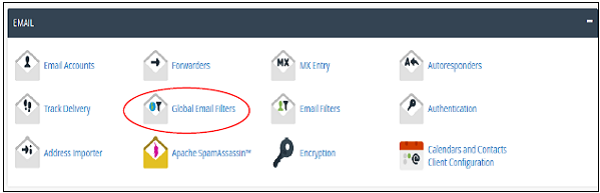
Step 1 − Click on Apache Spamassassin link found under the Email section of cPanel Home.
 Step 2 − If Apache Spamassassin is currently disabled, then
you can enable it by clicking Enable Apache Spamassassin. If it is
already enabled, you can disable it by clicking Disable Apache
Spamassassin.
Step 2 − If Apache Spamassassin is currently disabled, then
you can enable it by clicking Enable Apache Spamassassin. If it is
already enabled, you can disable it by clicking Disable Apache
Spamassassin.

Step 1 − Find Filter options in Apache Spamassassin Interface.
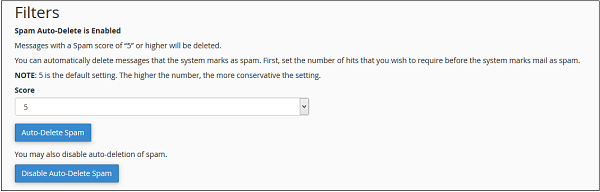 Step 2 − Select Spam score from dropdown between1 to 10. Lower
score is stricter, while higher score is more permissive. This means
score 1 will filter many emails and will delete most of the emails you
receive and score 10 will allow more emails to pass through the filter.
Step 2 − Select Spam score from dropdown between1 to 10. Lower
score is stricter, while higher score is more permissive. This means
score 1 will filter many emails and will delete most of the emails you
receive and score 10 will allow more emails to pass through the filter.
Step 3 − Click Auto–Delete Spam to enable automatic spam deletion based of your chosen score.
To disable automatic spam deletion, click Disable Auto–Delete Spam.
You can choose the spam emails to auto delete according to spam score. If you choose auto spam deletion with spam score of 5, then all emails having 5 or more spam score will be deleted automatically.
Enable or Disable Apache Spamassassin
To enable Apache Spamassassin, use the following steps −Step 1 − Click on Apache Spamassassin link found under the Email section of cPanel Home.
Step 2 − If Apache Spamassassin is currently disabled, then
you can enable it by clicking Enable Apache Spamassassin. If it is
already enabled, you can disable it by clicking Disable Apache
Spamassassin.
Setup Spam Auto–Delete
To setup Spam Auto–Delete, follow these steps −Step 1 − Find Filter options in Apache Spamassassin Interface.
Step 2 − Select Spam score from dropdown between1 to 10. Lower
score is stricter, while higher score is more permissive. This means
score 1 will filter many emails and will delete most of the emails you
receive and score 10 will allow more emails to pass through the filter.Step 3 − Click Auto–Delete Spam to enable automatic spam deletion based of your chosen score.
To disable automatic spam deletion, click Disable Auto–Delete Spam.


No comments:
Post a Comment