
BackboneJS is very easy to setup and work. This chapter will discuss the download and setup of the BackboneJS Library.
BackboneJS can be used in the following two ways −
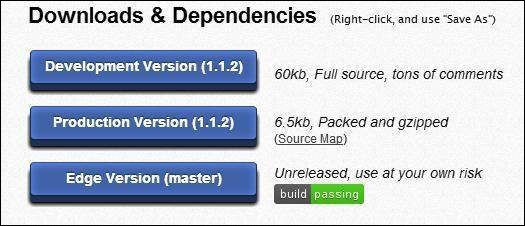 As you can see, there are three options for download of this library −
As said above, BackboneJS has a dependency of the following JavaScript −
There's a html code at the start of body tag
Next, we have added the following CDNs
Save this page as myFirstExample.html. Open this in your browser and the screen will show the following text.

BackboneJS can be used in the following two ways −
- Downloading UI library from its official website.
- Downloading UI library from CDNs.
Downloading the UI library from its official website
When you open the link http://backbonejs.org/, you will get to see a screenshot as shown below −
As you can see, there are three options for download of this library −- Development Version − Right click on this button and save as and you get the full source JavaScript library.
- Production Version − Right click on this button and save as and you get the Backbone-min.js library file which is packed and gzipped.
- Edge Version − Right click on this button and save as and you get an unreleased version, i.e., development is going on; hence you need to use it at your own risk.
Dependencies
BackboneJS depends on the following JavaScript files −- Underscore.js − This is the only hard dependency which needs to be included. You can get it from here.
- jQuery.js − Include this file for RESTful persistence, history support via Backbone.Router and DOM manipulation with Backbone.View. You can get it from here.
- json2.js − Include this file for older Internet Explorer support. You can get it from here.
Download UI Library from CDNs
A CDN or Content Delivery Network is a network of servers designed to serve files to users. If you use a CDN link in your web page, it moves the responsibility of hosting files from your own servers to a series of external ones. This also offers an advantage that if the visitor to your webpage has already downloaded a copy of BackboneJS from the same CDN, it won't have to be re-downloaded.As said above, BackboneJS has a dependency of the following JavaScript −
- jQuery
- Underscore
<script type = "text/javascript"
   src = "https://ajax.googleapis.com/ajax/libs/jquery/1.5.2/jquery.min.js"></script>
<script type = "text/javascript"
   src = "https://ajax.cdnjs.com/ajax/libs/underscore.js/1.1.4/underscore-min.js"></script>
<script type = "text/javascript"
   src = "https://ajax.cdnjs.com/ajax/libs/backbone.js/0.3.3/backbone-min.js"></script>
Note − We are using the CDN versions of the library throughout this tutorial.
Example
Let's create a simple example using BackboneJS.<!DOCTYPE html> <html> <head> <meta charset = "UTF-8"> <meta http-equiv = "X-UA-Compatible" content = "IE = edge,chrome = 1"> <title>Hello World using Backbone.js</title> </head> <body> <!-- ========= --> <!-- Your HTML --> <!-- ========= --> <div id = "container">Loading...</div> <!-- ========= --> <!-- Libraries --> <!-- ========= --> <script src = "https://code.jquery.com/jquery-2.1.3.min.js" type = "text/javascript"></script> <script src = "https://cdnjs.cloudflare.com/ajax/libs/underscore.js/1.3.3/underscoremin.js" type = "text/javascript"></script> <script src = "https://cdnjs.cloudflare.com/ajax/libs/backbone.js/0.9.2/backbone-min.js" type = "text/javascript"></script> <!-- =============== --> <!-- Javascript code --> <!-- =============== --> <script type = "text/javascript"> var AppView = Backbone.View.extend ({ // el - stands for element. Every view has an element associated with HTML content, will be rendered. el: '#container', // It's the first function called when this view is instantiated. initialize: function() { this.render(); }, // $el - it's a cached jQuery object (el), in which you can use jQuery functions to push content. //Like the Hello TutorialsPoint in this case. render: function() { this.$el.html("Hello TutorialsPoint!!!"); } }); var appView = new AppView(); </script> </body> </html>The code comments are self-explanatory. A few more details are given below −
There's a html code at the start of body tag
<div id = "container">Loading...</div>This prints Loading...
Next, we have added the following CDNs
<script src = "https://code.jquery.com/jquery-2.1.3.min.js"
   type = "text/javascript"></script>
<script src = "https://cdnjs.cloudflare.com/ajax/libs/underscore.js/1.3.3/underscore-min.js"
   type = "text/javascript"></script>
<script src = "https://cdnjs.cloudflare.com/ajax/libs/backbone.js/0.9.2/backbone-min.js"
   type = "text/javascript"></script>
Next, we have the following script −
var AppView = Backbone.View.extend ({

   // el - stands for element. Every view has an element associated with HTML content,
   //will be rendered.
   el: '#container',

   // It's the first function called when this view is instantiated.
   initialize: function() {
      this.render();
   },

   // $el - it's a cached jQuery object (el), in which you can use jQuery functions to push content.
   //Like the Hello World in this case.
   render: function() {
      this.$el.html("<h1>Hello TutorialsPoint!!!</h1>");
   }
});
var appView = new AppView();
The comments are self-explanatory. In the last line, we are initializing new AppView(). This will print the "Hello TutorialsPoint" in the div with id = "container"
Save this page as myFirstExample.html. Open this in your browser and the screen will show the following text.


No comments:
Post a Comment