
NetBeans 6.7 and newer has inbuild support for Maven. In case of
previous version, Maven plugin is available in plugin Manager. We're
using NetBeans 6.9 in this example.
Some of features of NetBeans are listed below
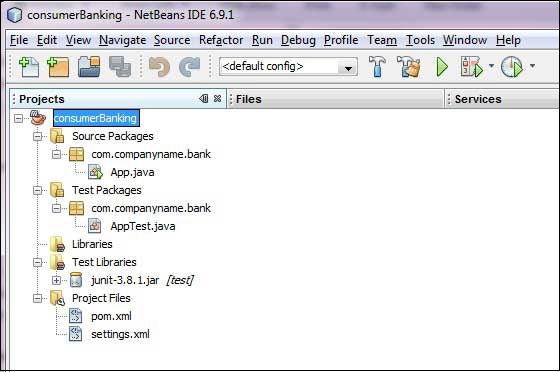
 Now, you can see the maven project in NetBeans.Have a look at
consumerBanking project Libraries and Test Libraries.You can see that
NetBeans has added Maven dependencies to its build path.
Now, you can see the maven project in NetBeans.Have a look at
consumerBanking project Libraries and Test Libraries.You can see that
NetBeans has added Maven dependencies to its build path.
 Maven will start building the project. You can see the output in NetBeans Console
Some of features of NetBeans are listed below
- You can run Maven goals from NetBeans.
- You can can view the output of Maven commands inside the NetBeans using its own console.
- You can update maven dependencies with IDE.
- You can Launch Maven builds from within NetBeans.
- NetBeans does the dependency management automatically based on Maven's pom.xml.
- NetBeans resolves Maven dependencies from its workspace without installing to local Maven repository (requires dependency project be in same workspace).
- NetBeans automatic downloads required dependencies and sources from the remote Maven repositories.
- NetBeans provides wizards for creating new Maven projects, pom.xml
- NetBeans provides a Maven Repository browser that enables you to view your local repository and registered external Maven repositories.
Open a maven project in NetBeans
- Open NetBeans.
- Select File Menu > Open Project option.
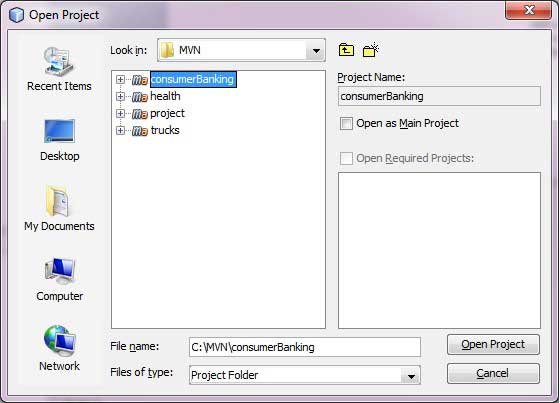
- Select Project location, where a project was created using Maven. We've create a Java Project consumerBanking.See Maven Creating Project to see how to create a project using Maven.
Now, you can see the maven project in NetBeans.Have a look at
consumerBanking project Libraries and Test Libraries.You can see that
NetBeans has added Maven dependencies to its build path.
Build a maven project in NetBeans
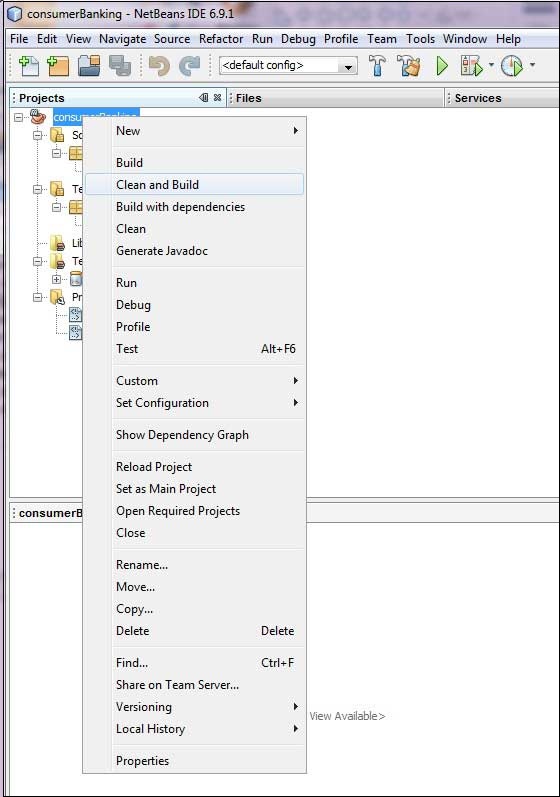
Now, Its time to build this project using maven capability of NetBeans.- Right Click on consumerBanking project to open context menu.
- Select Clean and Build as option
Maven will start building the project. You can see the output in NetBeans ConsoleNetBeans: Executing 'mvn.bat -Dnetbeans.execution=true clean install' NetBeans: JAVA_HOME=C:\Program Files\Java\jdk1.6.0_21 Scanning for projects... ------------------------------------------------------------------------ Building consumerBanking task-segment: [clean, install] ------------------------------------------------------------------------ [clean:clean] [resources:resources] [WARNING] Using platform encoding (Cp1252 actually) to copy filtered resources, i.e. build is platform dependent! skip non existing resourceDirectory C:\MVN\consumerBanking\src\main\resources [compiler:compile] Compiling 2 source files to C:\MVN\consumerBanking\target\classes [resources:testResources] [WARNING] Using platform encoding (Cp1252 actually) to copy filtered resources, i.e. build is platform dependent! skip non existing resourceDirectory C:\MVN\consumerBanking\src\test\resources [compiler:testCompile] Compiling 1 source file to C:\MVN\consumerBanking\target\test-classes [surefire:test] Surefire report directory: C:\MVN\consumerBanking\target\surefire-reports ------------------------------------------------------- T E S T S ------------------------------------------------------- Running com.companyname.bank.AppTest Tests run: 1, Failures: 0, Errors: 0, Skipped: 0, Time elapsed: 0.023 sec Results : Tests run: 1, Failures: 0, Errors: 0, Skipped: 0 [jar:jar] Building jar: C:\MVN\consumerBanking\target\consumerBanking-1.0-SNAPSHOT.jar [install:install] Installing C:\MVN\consumerBanking\target\consumerBanking-1.0-SNAPSHOT.jar to C:\Users\GB3824\.m2\repository\com\companyname\bank\consumerBanking\ 1.0-SNAPSHOT\consumerBanking-1.0-SNAPSHOT.jar ------------------------------------------------------------------------ BUILD SUCCESSFUL ------------------------------------------------------------------------ Total time: 9 seconds Finished at: Thu Jul 19 12:57:28 IST 2012 Final Memory: 16M/85M ------------------------------------------------------------------------
Run Application in NetBeans
Now, right click on App.java. Select Run File As option. You will see the result in NetBeans Console.NetBeans: Executing 'mvn.bat -Dexec.classpathScope=runtime -Dexec.args=-classpath %classpath com.companyname.bank.App -Dexec.executable=C:\Program Files\Java\jdk1.6.0_21\bin\java.exe -Dnetbeans.execution=true process-classes org.codehaus.mojo:exec-maven-plugin:1.1.1:exec' NetBeans: JAVA_HOME=C:\Program Files\Java\jdk1.6.0_21 Scanning for projects... ------------------------------------------------------------------------ Building consumerBanking task-segment: [process-classes, org.codehaus.mojo:exec-maven-plugin:1.1.1:exec] ------------------------------------------------------------------------ [resources:resources] [WARNING] Using platform encoding (Cp1252 actually) to copy filtered resources, i.e. build is platform dependent! skip non existing resourceDirectory C:\MVN\consumerBanking\src\main\resources [compiler:compile] Nothing to compile - all classes are up to date [exec:exec] Hello World! ------------------------------------------------------------------------ BUILD SUCCESSFUL ------------------------------------------------------------------------ Total time: 1 second Finished at: Thu Jul 19 14:18:13 IST 2012 Final Memory: 7M/64M


No comments:
Post a Comment