
Web sites are designed for repeated visits from the users.
Personalization allows a site to remember the user identity and other
information details, and it presents an individualistic environment to
each user.
ASP.NET provides services for personalizing a web site to suit a particular client's taste and preference.
This information is defined in the web.config file of the application and ASP.NET runtime reads and uses it. This job is done by the personalization providers.
The user profiles obtained from user data is stored in a default database created by ASP.NET. You can create your own database for storing profiles. The profile data definition is stored in the configuration file web.config.
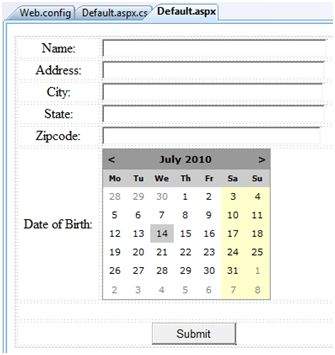
Add the text boxes to take the user input as defined in the profile and add a button for submitting the data:
 Update Page_load to display profile information:
ASP.NET provides services for personalizing a web site to suit a particular client's taste and preference.
Understanding Profiles
ASP.NET personalization service is based on user profile. User profile defines the kind of information about the user that the site needs. For example, name, age, address, date of birth, and phone number.This information is defined in the web.config file of the application and ASP.NET runtime reads and uses it. This job is done by the personalization providers.
The user profiles obtained from user data is stored in a default database created by ASP.NET. You can create your own database for storing profiles. The profile data definition is stored in the configuration file web.config.
Example
Let us create a sample site, where we want our application to remember user details like name, address, date of birth etc. Add the profile details in the web.config file within the <system.web> element.<configuration> <system.web> <profile> <properties> <add name="Name" type ="String"/> <add name="Birthday" type ="System.DateTime"/> <group name="Address"> <add name="Street"/> <add name="City"/> <add name="State"/> <add name="Zipcode"/> </group> </properties> </profile> </system.web> </configuration>When the profile is defined in the web.config file, the profile could be used through the Profile property found in the current HttpContext and also available via page.
Add the text boxes to take the user input as defined in the profile and add a button for submitting the data:
Update Page_load to display profile information:using System; using System.Data; using System.Configuration; using System.Web; using System.Web.Security; using System.Web.UI; using System.Web.UI.WebControls; using System.Web.UI.WebControls.WebParts; using System.Web.UI.HtmlControls; public partial class _Default : System.Web.UI.Page { protected void Page_Load(object sender, EventArgs e) { if (!this.IsPostBack) { ProfileCommon pc=this.Profile.GetProfile(Profile.UserName); if (pc != null) { this.txtname.Text = pc.Name; this.txtaddr.Text = pc.Address.Street; this.txtcity.Text = pc.Address.City; this.txtstate.Text = pc.Address.State; this.txtzip.Text = pc.Address.Zipcode; this.Calendar1.SelectedDate = pc.Birthday; } } } }Write the following handler for the Submit button, for saving the user data into the profile:
protected void btnsubmit_Click(object sender, EventArgs e)
{
   ProfileCommon pc=this.Profile.GetProfile(Profile.UserName);

   if (pc != null)
   {
      pc.Name = this.txtname.Text;
      pc.Address.Street = this.txtaddr.Text;
      pc.Address.City = this.txtcity.Text;
      pc.Address.State = this.txtstate.Text;
      pc.Address.Zipcode = this.txtzip.Text;
      pc.Birthday = this.Calendar1.SelectedDate;

      pc.Save();
   }
}
When the page is executed for the first time, the user needs to enter the information. However, next time the user details would be automatically loaded.
Attributes for the <add> Element
Apart from the name and type attributes that we have used, there are other attributes to the <add> element. Following table illustrates some of these attributes:| Attributes | Description |
|---|---|
| name | The name of the property. |
| type | By default the type is string but it allows any fully qualified class name as data type. |
| serializeAs | The format to use when serializing this value. |
| readOnly | A read only profile value cannot be changed, by default this property is false. |
| defaultValue | A default value that is used if the profile does not exist or does not have information. |
| allowAnonymous | A Boolean value indicating whether this property can be used with the anonymous profiles. |
| Provider | The profiles provider that should be used to manage just this property. |
Anonymous Personalization
Anonymous personalization allows the user to personalize the site before identifying themselves. For example, Amazon.com allows the user to add items in the shopping cart before they log in. To enable this feature, the web.config file could be configured as:<anonymousIdentification enabled ="true" cookieName=".ASPXANONYMOUSUSER" cookieTimeout="120000" cookiePath="/" cookieRequiresSSL="false" cookieSlidingExpiration="true" cookieprotection="Encryption" coolieless="UseDeviceProfile"/>


No comments:
Post a Comment