
Tapestry Application is simply a collection of Tapestry Pages. They
work together to form a well-defined Web Application. Each Page will
have a corresponding XML Template and Zero, one or more Components.
The Page and Component are same except that the Page is a root component and usually created by an application developer.
Components are children of the root Pagecomponent. Tapestry have lots of built-in components and has the option to create a custom component.
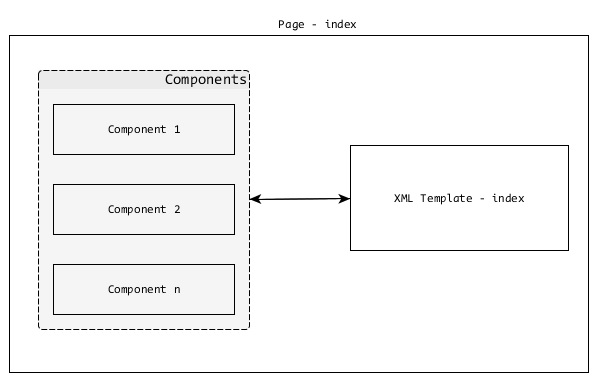
You can see here that the path structure is similar for Page and Template except that the template is in the Resource Folder.
For example, a user registration page in a Tapestry application with package name – com.example.MyFirstApplication will have the following Page and Template files −
“/src/main/resources/com/example/MyFirstApplication/pages/helloworld.html”.
The Page and Component are same except that the Page is a root component and usually created by an application developer.
Components are children of the root Pagecomponent. Tapestry have lots of built-in components and has the option to create a custom component.
Pages
As discussed earlier, Pages are building blocks of a Tapestry Application. Pages are plain POJOs, placed under – /src/main/java/«package_path»/pages/ folder. Every Page will have a corresponding XML Template and its default location is – /src/main/resources/«package_name»/pages/.You can see here that the path structure is similar for Page and Template except that the template is in the Resource Folder.
For example, a user registration page in a Tapestry application with package name – com.example.MyFirstApplication will have the following Page and Template files −
- Java Class −
/src/main/java/com/example/MyFirstApplication/pages/index.java - XML Template −
/src/main/resources/com/example/MyFirstApplication/pages/index.tml
package com.example.MyFirstApplication.pages;
public class HelloWorld {
}
Then, create an XML Template at –
“/src/main/resources/com/example/MyFirstApplication/pages/helloworld.html”.
<html xmlns:t = "http://tapestry.apache.org/schema/tapestry_5_4.xsd">
   <head>
      <title>Hello World Page</title>
   </head>
   <body>
      <h1>Hello World</h1>
   </body>
</html>
Now, this page can be accessed at https://localhost:8080/myapp/helloworld. This is a simple tapestry page. Tapestry offers lot more features to develop dynamic web pages, which we will discuss in the following chapters.


No comments:
Post a Comment