
Requirement of Packaging applications using EJB 3.0 are similar to
that of J2EE platform. Ejb components are packaged into modules as jar
files and are packaged into application enterprise archive as ear file.
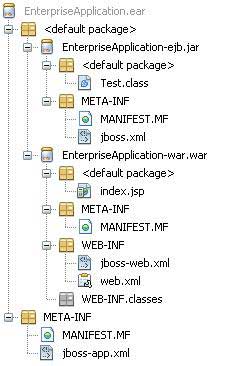
There are majorly three components of any enterprise application.
 In NetBeans it is very easy to create, develop, package and deploy the J2EE applications.
In NetBeans IDE, select ,File > New Project >.Select project type under category,Java EE, Project type as Enterprise Application. Click Next > button.Enter project name and location. Click Finish > button. We've choosen name as EnterpriseApplicaton.
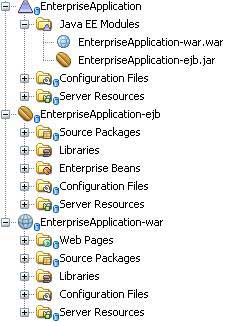
Select Server and Settings. Keep Create EJB Module and Create Web Application Module checked with default names provided. Click finish button. NetBeans will create the following structure in project window.
 Right click on Project Enterprise Application in project explorer and select Build.
- jar - Java Application aRchive, containing ejb modules, ejb client modules and utility modules.
- war - Web Application aRchive, containing web modules.
- ear - Enterprise Application aRchive, containing jars and war module.
In NetBeans it is very easy to create, develop, package and deploy the J2EE applications.In NetBeans IDE, select ,File > New Project >.Select project type under category,Java EE, Project type as Enterprise Application. Click Next > button.Enter project name and location. Click Finish > button. We've choosen name as EnterpriseApplicaton.
Select Server and Settings. Keep Create EJB Module and Create Web Application Module checked with default names provided. Click finish button. NetBeans will create the following structure in project window.
Right click on Project Enterprise Application in project explorer and select Build.ant -f D:\\SVN\\EnterpriseApplication dist pre-init: init-private: init-userdir: init-user: init-project: do-init: post-init: init-check: init: deps-jar: deps-j2ee-archive: EnterpriseApplication-ejb.init: EnterpriseApplication-ejb.deps-jar: EnterpriseApplication-ejb.compile: EnterpriseApplication-ejb.library-inclusion-in-manifest: Building jar: D:\SVN\EnterpriseApplication\EnterpriseApplication-ejb\dist\EnterpriseApplication-ejb.jar EnterpriseApplication-ejb.dist-ear: EnterpriseApplication-war.init: EnterpriseApplication-war.deps-module-jar: EnterpriseApplication-war.deps-ear-jar: EnterpriseApplication-ejb.init: EnterpriseApplication-ejb.deps-jar: EnterpriseApplication-ejb.compile: EnterpriseApplication-ejb.library-inclusion-in-manifest: EnterpriseApplication-ejb.dist-ear: EnterpriseApplication-war.deps-jar: EnterpriseApplication-war.library-inclusion-in-archive: EnterpriseApplication-war.library-inclusion-in-manifest: EnterpriseApplication-war.compile: EnterpriseApplication-war.compile-jsps: EnterpriseApplication-war.do-ear-dist: Building jar: D:\SVN\EnterpriseApplication\EnterpriseApplication-war\dist\EnterpriseApplication-war.war EnterpriseApplication-war.dist-ear: pre-pre-compile: pre-compile: Copying 1 file to D:\SVN\EnterpriseApplication\build Copying 1 file to D:\SVN\EnterpriseApplication\build do-compile: post-compile: compile: pre-dist: do-dist-without-manifest: do-dist-with-manifest: Building jar: D:\SVN\EnterpriseApplication\dist\EnterpriseApplication.ear post-dist: dist: BUILD SUCCESSFUL (total time: 1 second)Here you can see, Netbeans prepares Jar first, then War and in the end the ear file carrying the jar and war file. Each jar,war and ear file carries a meta-inf folder to have meta data as per the J2EE specification.


No comments:
Post a Comment