
Command pattern is a data driven design pattern and falls under
behavioral pattern category. A request is wrapped under an object as
command and passed to invoker object. Invoker object looks for the
appropriate object which can handle this command and passes the command
to the corresponding object which executes the command.
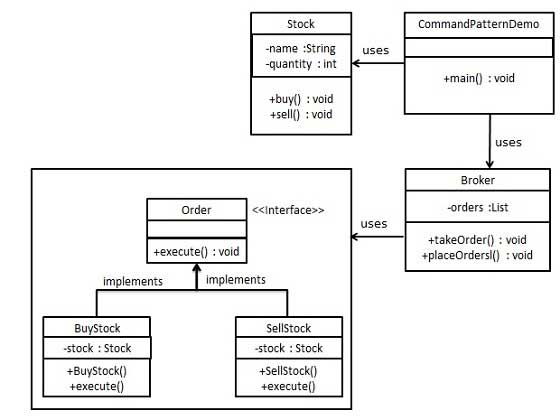
Broker object uses command pattern to identify which object will execute which command based on the type of command. CommandPatternDemo, our demo class, will use Broker class to demonstrate command pattern.
Order.java
Stock.java
BuyStock.java
Broker.java
CommandPatternDemo.java
Implementation
We have created an interface Order which is acting as a command. We have created a Stock class which acts as a request. We have concrete command classes BuyStock and SellStock implementing Order interface which will do actual command processing. A class Broker is created which acts as an invoker object. It can take and place orders.Broker object uses command pattern to identify which object will execute which command based on the type of command. CommandPatternDemo, our demo class, will use Broker class to demonstrate command pattern.
Step 1
Create a command interface.Order.java
public interface Order {
   void execute();
}
Step 2
Create a request class.Stock.java
public class Stock {

   private String name = "ABC";
   private int quantity = 10;

   public void buy(){
      System.out.println("Stock [ Name: "+name+",
         Quantity: " + quantity +" ] bought");
   }
   public void sell(){
      System.out.println("Stock [ Name: "+name+",
         Quantity: " + quantity +" ] sold");
   }
}
Step 3
Create concrete classes implementing the Order interface.BuyStock.java
public class BuyStock implements Order {
   private Stock abcStock;

   public BuyStock(Stock abcStock){
      this.abcStock = abcStock;
   }

   public void execute() {
      abcStock.buy();
   }
}
SellStock.java
public class SellStock implements Order {
   private Stock abcStock;

   public SellStock(Stock abcStock){
      this.abcStock = abcStock;
   }

   public void execute() {
      abcStock.sell();
   }
}
Step 4
Create command invoker class.Broker.java
import java.util.ArrayList;
import java.util.List;

   public class Broker {
   private List<Order> orderList = new ArrayList<Order>();

   public void takeOrder(Order order){
      orderList.add(order);
   }

   public void placeOrders(){

      for (Order order : orderList) {
         order.execute();
      }
      orderList.clear();
   }
}
Step 5
Use the Broker class to take and execute commands.CommandPatternDemo.java
public class CommandPatternDemo {
   public static void main(String[] args) {
      Stock abcStock = new Stock();

      BuyStock buyStockOrder = new BuyStock(abcStock);
      SellStock sellStockOrder = new SellStock(abcStock);

      Broker broker = new Broker();
      broker.takeOrder(buyStockOrder);
      broker.takeOrder(sellStockOrder);

      broker.placeOrders();
   }
}
Step 6
Verify the output.Stock [ Name: ABC, Quantity: 10 ] bought Stock [ Name: ABC, Quantity: 10 ] sold


No comments:
Post a Comment