
The DrawingArea widget presents a blank canvas containing a gtk.gdk.Window on which objects such as line, rectangle, arc, etc. can be drawn.
PyGTK uses Cairo library for such drawing operations. Cairo is a popular 2D vector graphics library. It is written in C., although, it has bindings in most Languages such as C++, Java, Python, PHP etc. Cairo library can be used to draw on standard output devices in various operating systems. It can also be used to create PDF, SVG and post-script files.
In order to perform different drawing operations, we must fetch the device on text of the target output object. In this case, since the drawing is appearing on gtk.DrawingArea widget, the device context of gdk.Window contained inside it is obtained. This class has a cairo-create() method which returns the device context.
The Mouse and Keyboard events can also be used to invoke callbacks by add_events() method of the gtk.Widget class.
Of particular interest is the expose-event signal which is emitted when the DrawingArea canvas first comes up. The different methods for drawing 2D objects, that are defined in the Cairo library are called from this callback connected to the expose-event signal. These methods draw corresponding objects on the Cairo device context.
The following are the available drawing methods −
PyGTK uses Cairo library for such drawing operations. Cairo is a popular 2D vector graphics library. It is written in C., although, it has bindings in most Languages such as C++, Java, Python, PHP etc. Cairo library can be used to draw on standard output devices in various operating systems. It can also be used to create PDF, SVG and post-script files.
In order to perform different drawing operations, we must fetch the device on text of the target output object. In this case, since the drawing is appearing on gtk.DrawingArea widget, the device context of gdk.Window contained inside it is obtained. This class has a cairo-create() method which returns the device context.
area = gtk.DrawingArea()
dc = area.window.cairo_create()
The DrawingArea widget can be connected to the callbacks based on the following signals emitted by it −
| Realize | To take any necessary actions when the widget is instantiated on a particular display. |
| configure_event | To take any necessary actions when the widget changes size. |
| expose_event | To handle redrawing the contents of the widget when a drawing area first comes on screen, or when it's covered by another window and then uncovered (exposed). |
Of particular interest is the expose-event signal which is emitted when the DrawingArea canvas first comes up. The different methods for drawing 2D objects, that are defined in the Cairo library are called from this callback connected to the expose-event signal. These methods draw corresponding objects on the Cairo device context.
The following are the available drawing methods −
- dc.rectangle(x,y,w,h) − This draws a rectangle at the specified top left coordinate and having givwn width and height.
- dc.arc(x,y,r,a1,a2) − This draws a circular arc with given radius and two angles.
- dc.line(x1, y1, x2, y2) − This draws a line between two pairs of coordinates.
- dc.line_to(x,y) − This draws a line from the current position to (x,y)
- dc.show_text(str) − draws string at current cursor position
- dc.stroke() − draws outline
- dc.fill() − fills shape with current color
- dc.set_color_rgb(r,g,b) − sets color to outline and fill with r, g and b values between 0.0 to 1.0
Example
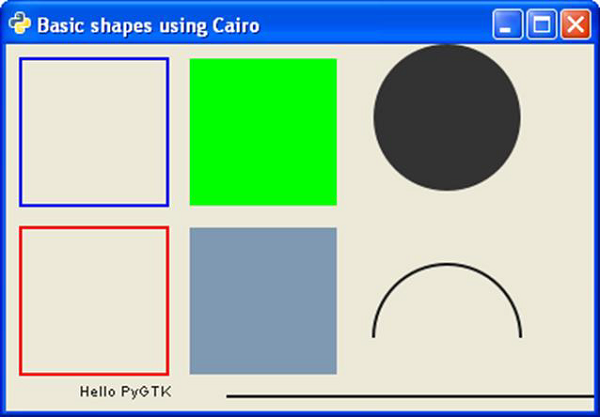
The following script draws different shapes and test using Cairo methods.import gtk import math class PyApp(gtk.Window): def __init__(self): super(PyApp, self).__init__() self.set_title("Basic shapes using Cairo") self.set_size_request(400, 250) self.set_position(gtk.WIN_POS_CENTER) self.connect("destroy", gtk.main_quit) darea = gtk.DrawingArea() darea.connect("expose-event", self.expose) self.add(darea) self.show_all() def expose(self, widget, event): cr = widget.window.cairo_create() cr.set_line_width(2) cr.set_source_rgb(0,0,1) cr.rectangle(10,10,100,100) cr.stroke() cr.set_source_rgb(1,0,0) cr.rectangle(10,125,100,100) cr.stroke() cr.set_source_rgb(0,1,0) cr.rectangle(125,10,100,100) cr.fill() cr.set_source_rgb(0.5,0.6,0.7) cr.rectangle(125,125,100,100) cr.fill() cr.arc(300, 50, 50,0, 2*math.pi) cr.set_source_rgb(0.2,0.2,0.2) cr.fill() cr.arc(300, 200, 50, math.pi,0) cr.set_source_rgb(0.1,0.1,0.1) cr.stroke() cr.move_to(50,240) cr.show_text("Hello PyGTK") cr.move_to(150,240) cr.line_to(400,240) cr.stroke() PyApp() gtk.main()The above script will generate the following output −


No comments:
Post a Comment