
When to use JCL
JCL is used in a mainframe environment to act as a communication between a program (Example: COBOL, Assembler or PL/I) and the operating system. In a mainframe environment, programs can be executed in batch and online mode.Example of a batch system can be processing the bank transactions through a VSAM (Virtual Storage Access Method) file and applying it to the corresponding accounts. Example of an online system can be a back office screen used by staffs in a bank to open an account. In batch mode, programs are submitted to the operating system as a job through a JCL.
Batch and Online processing differ in the aspect of input, output and program execution request. In batch processing, these aspects are fed into a JCL which is in turn received by the Operating System.
Job Processing
A job is a unit of work which can be made up of many job steps. Each job step is specified in a Job Control Language (JCL) through a set of Job Control Statements.The Operating System uses Job Entry System (JES) to receive jobs into the Operating System, to schedule them for processing and to control the output.
Job processing goes through a series of steps as given below:
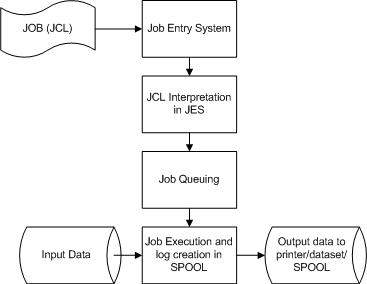
- Job Submission - Submitting the JCL to JES.
- Job Conversion - The JCL along with the PROC is converted into an interpreted text to be understood by JES and stored into a dataset, which we call as SPOOL.
- Job Queuing - JES decides the priority of the job based on CLASS and PRTY parameters in the JOB statement (explained in JCL - JOB Statement chapter). The JCL errors are checked and the job is scheduled into the job queue if there are no errors.
- Job Execution - When the job reaches its highest priority, it is taken up for execution from the job queue. The JCL is read from the SPOOL, the program is executed and the output is redirected to the corresponding output destination as specified in the JCL.
- Purging - When the job is complete, the allocated resources and the JES SPOOL space is released. In order to store the job log, we need to copy the job log to another dataset before it is released from the SPOOL.


No comments:
Post a Comment