
Node.js is a single-threaded application, but it can support concurrency via the concept of event and callbacks. Every API of Node.js is asynchronous and being single-threaded, they use async function calls
to maintain concurrency.
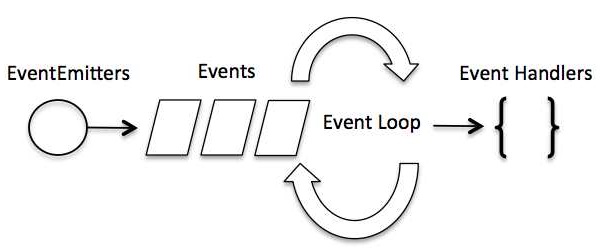
Node uses observer pattern. Node thread keeps an event loop and whenever a task gets completed, it fires the corresponding event which signals the event-listener function to execute.
In an event-driven application, there is generally a main loop that listens for events, and then triggers a callback function when one of those events is detected.
 Although events look quite similar to callbacks, the difference lies
in the fact that callback functions are called when an asynchronous
function returns its result, whereas event handling works on the
observer pattern. The functions that listen to events act as Observers.
Whenever an event gets fired, its listener function starts executing.
Node.js has multiple in-built events available through events module and
EventEmitter class which are used to bind events and event-listeners as
follows −
Although events look quite similar to callbacks, the difference lies
in the fact that callback functions are called when an asynchronous
function returns its result, whereas event handling works on the
observer pattern. The functions that listen to events act as Observers.
Whenever an event gets fired, its listener function starts executing.
Node.js has multiple in-built events available through events module and
EventEmitter class which are used to bind events and event-listeners as
follows −
Node uses observer pattern. Node thread keeps an event loop and whenever a task gets completed, it fires the corresponding event which signals the event-listener function to execute.
Event-Driven Programming
Node.js uses events heavily and it is also one of the reasons why Node.js is pretty fast compared to other similar technologies. As soon as Node starts its server, it simply initiates its variables, declares functions and then simply waits for the event to occur.In an event-driven application, there is generally a main loop that listens for events, and then triggers a callback function when one of those events is detected.
Although events look quite similar to callbacks, the difference lies
in the fact that callback functions are called when an asynchronous
function returns its result, whereas event handling works on the
observer pattern. The functions that listen to events act as Observers.
Whenever an event gets fired, its listener function starts executing.
Node.js has multiple in-built events available through events module and
EventEmitter class which are used to bind events and event-listeners as
follows −// Import events module
var events = require('events');
// Create an eventEmitter object
var eventEmitter = new events.EventEmitter();
Following is the syntax to bind an event handler with an event −// Bind event and even handler as follows
eventEmitter.on('eventName', eventHandler);
We can fire an event programmatically as follows −// Fire an event
eventEmitter.emit('eventName');
Example
Create a js file named main.js with the following code −// Import events module var events = require('events'); // Create an eventEmitter object var eventEmitter = new events.EventEmitter(); // Create an event handler as follows var connectHandler = function connected() { console.log('connection succesful.'); // Fire the data_received event eventEmitter.emit('data_received'); } // Bind the connection event with the handler eventEmitter.on('connection', connectHandler); // Bind the data_received event with the anonymous function eventEmitter.on('data_received', function(){ console.log('data received succesfully.'); }); // Fire the connection event eventEmitter.emit('connection'); console.log("Program Ended.");Now let's try to run the above program and check its output −
$ mnode main.jsIT should produce the following result −
connection successful.
data received successfully.
Program Ended.
How Node Applications Work?
In Node Application, any async function accepts a callback as the last parameter and a callback function accepts an error as the first parameter. Let's revisit the previous example again. Create a text file named input.txt with the following content.Tutorials Point is giving self learning content to teach the world in simple and easy way!!!!!Create a js file named main.js having the following code −
var fs = require("fs");

fs.readFile('input.txt', function (err, data) {
   if (err){
      console.log(err.stack);
      return;
   }
   console.log(data.toString());
});
console.log("Program Ended");
Here fs.readFile() is a async function whose purpose is to read a file. If an error occurs during the read operation, then the err object will contain the corresponding error, else data will contain the contents of the file. readFile passes err and data to the callback function after the read operation is complete, which finally prints the content.
Program Ended
Tutorials Point is giving self learning content
to teach the world in simple and easy way!!!!!


No comments:
Post a Comment