
LISP allows you to define single or multiple-dimension arrays using the make-array function. An array can store any LISP object as its elements.
All arrays consist of contiguous memory locations. The lowest address corresponds to the first element and the highest address to the last element.
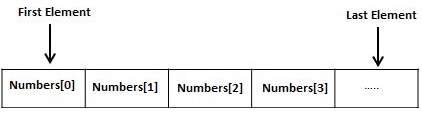 The number of dimensions of an array is called its rank.
In LISP, an array element is specified by a sequence of non-negative integer indices. The length of the sequence must equal the rank of the array. Indexing starts from zero.
For example, to create an array with 10- cells, named my-array, we can write:
For example, to access the content of the tenth cell, we write:
Create a new source code file named main.lisp and type the following code in it.
All arrays consist of contiguous memory locations. The lowest address corresponds to the first element and the highest address to the last element.
The number of dimensions of an array is called its rank.In LISP, an array element is specified by a sequence of non-negative integer indices. The length of the sequence must equal the rank of the array. Indexing starts from zero.
For example, to create an array with 10- cells, named my-array, we can write:
(setf my-array (make-array '(10)))The aref function allows accessing the contents of the cells. It takes two arguments, the name of the array and the index value.
For example, to access the content of the tenth cell, we write:
(aref my-array 9)
Example 1
Create a new source code file named main.lisp and type the following code in it.(write (setf my-array (make-array '(10)))) (terpri) (setf (aref my-array 0) 25) (setf (aref my-array 1) 23) (setf (aref my-array 2) 45) (setf (aref my-array 3) 10) (setf (aref my-array 4) 20) (setf (aref my-array 5) 17) (setf (aref my-array 6) 25) (setf (aref my-array 7) 19) (setf (aref my-array 8) 67) (setf (aref my-array 9) 30) (write my-array)When you execute the code, it returns the following result:
#(NIL NIL NIL NIL NIL NIL NIL NIL NIL NIL)
#(25 23 45 10 20 17 25 19 67 30)
Example 2
Let us create a 3-by-3 array.Create a new source code file named main.lisp and type the following code in it.
(setf x (make-array '(3 3)
   :initial-contents '((0 1 2 ) (3 4 5) (6 7 8)))
)
(write x)
When you execute the code, it returns the following result:
#2A((0 1 2) (3 4 5) (6 7 8))
Example 3
Create a new source code file named main.lisp and type the following code in it.(setq a (make-array '(4 3))) (dotimes (i 4) (dotimes (j 3) (setf (aref a i j) (list i 'x j '= (* i j))) ) ) (dotimes (i 4) (dotimes (j 3) (print (aref a i j)) ) )When you execute the code, it returns the following result:
(0 X 0 = 0)
(0 X 1 = 0)
(0 X 2 = 0)
(1 X 0 = 0)
(1 X 1 = 1)
(1 X 2 = 2)
(2 X 0 = 0)
(2 X 1 = 2)
(2 X 2 = 4)
(3 X 0 = 0)
(3 X 1 = 3)
(3 X 2 = 6)
Complete Syntax for the make-array Function
The make-array function takes many other arguments. Let us look at the complete syntax of this function:make-array dimensions :element-type :initial-element :initial-contents :adjustable :fill-pointer :displaced-to :displaced-index-offsetApart from the dimensions argument, all other arguments are keywords. The following table provides brief description of the arguments.
| Argument | Description |
|---|---|
| dimensions | It gives the dimensions of the array. It is a number for one-dimensional array, and a list for multi-dimensional array. |
| :element-type | It is the type specifier, default value is T, i.e. any type |
| :initial-element | Initial elements value. It will make an array with all the elements initialized to a particular value. |
| :initial-content | Initial content as object. |
| :adjustable | It helps in creating a resizeable (or adjustable) vector whose underlying memory can be resized. The argument is a Boolean value indicating whether the array is adjustable or not, default value being NIL. |
| :fill-pointer | It keeps track of the number of elements actually stored in a resizeable vector. |
| :displaced-to | It helps in creating a displaced array or shared array that shares its contents with the specified array. Both the arrays should have same element type. The :displaced-to option may not be used with the :initial-element or :initial-contents option. This argument defaults to nil. |
| :displaced-index-offset | It gives the index-offset of the created shared array. |
Example 4
Create a new source code file named main.lisp and type the following code in it.(setq myarray (make-array '(3 2 3) :initial-contents '(((a b c) (1 2 3)) ((d e f) (4 5 6)) ((g h i) (7 8 9)) )) ) (setq array2 (make-array 4 :displaced-to myarray :displaced-index-offset 2)) (write myarray) (terpri) (write array2)When you execute the code, it returns the following result:
#3A(((A B C) (1 2 3)) ((D E F) (4 5 6)) ((G H I) (7 8 9)))
#(C 1 2 3)
If the displaced array is two dimensional:
(setq myarray (make-array '(3 2 3)
   :initial-contents
   '(((a b c) (1 2 3))
      ((d e f) (4 5 6))
      ((g h i) (7 8 9))
   ))
)
(setq array2 (make-array '(3 2) :displaced-to myarray :displaced-index-offset 2))
(write myarray)
(terpri)
(write array2)
When you execute the code, it returns the following result:
#3A(((A B C) (1 2 3)) ((D E F) (4 5 6)) ((G H I) (7 8 9)))
#2A((C 1) (2 3) (D E))
Let's change the displaced index offset to 5:
(setq myarray (make-array '(3 2 3)
   :initial-contents
   '(((a b c) (1 2 3))
      ((d e f) (4 5 6))
      ((g h i) (7 8 9))
   ))
)
(setq array2 (make-array '(3 2) :displaced-to myarray :displaced-index-offset 5))
(write myarray)
(terpri)
(write array2)
When you execute the code, it returns the following result:
#3A(((A B C) (1 2 3)) ((D E F) (4 5 6)) ((G H I) (7 8 9)))
#2A((3 D) (E F) (4 5))
Example 5
Create a new source code file named main.lisp and type the following code in it.;a one dimensional array with 5 elements, ;initail value 5 (write (make-array 5 :initial-element 5)) (terpri) ;two dimensional array, with initial element a (write (make-array '(2 3) :initial-element 'a)) (terpri) ;an array of capacity 14, but fill pointer 5, is 5 (write(length (make-array 14 :fill-pointer 5))) (terpri) ;however its length is 14 (write (array-dimensions (make-array 14 :fill-pointer 5))) (terpri) ; a bit array with all initial elements set to 1 (write(make-array 10 :element-type 'bit :initial-element 1)) (terpri) ; a character array with all initial elements set to a ; is a string actually (write(make-array 10 :element-type 'character :initial-element #\a)) (terpri) ; a two dimensional array with initial values a (setq myarray (make-array '(2 2) :initial-element 'a :adjustable t)) (write myarray) (terpri) ;readjusting the array (adjust-array myarray '(1 3) :initial-element 'b) (write myarray)When you execute the code, it returns the following result:
#(5 5 5 5 5)
#2A((A A A) (A A A))
5
(14)
#*1111111111
"aaaaaaaaaa"
#2A((A A) (A A))
#2A((A A B))


No comments:
Post a Comment