
MATLAB provides command for working with transforms, such as the Laplace and Fourier transforms. Transforms are used in science and engineering as a tool for simplifying analysis and look at data from another angle.
For example, the Fourier transform allows us to convert a signal represented as a function of time to a function of frequency. Laplace transform allows us to convert a differential equation to an algebraic equation.
MATLAB provides the laplace, fourier and fft commands to work with Laplace, Fourier and Fast Fourier transforms.
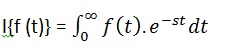 Laplace transform is also denoted as transform of f(t) to F(s). You can see this transform or integration process converts f(t), a function of the symbolic variable t, into another function F(s), with another variable s.
Laplace transform turns differential equations into algebraic ones. To compute a Laplace transform of a function f(t), write −
Create a script file and type the following code −
For example,
 The following result is displayed −
For example, the Fourier transform allows us to convert a signal represented as a function of time to a function of frequency. Laplace transform allows us to convert a differential equation to an algebraic equation.
MATLAB provides the laplace, fourier and fft commands to work with Laplace, Fourier and Fast Fourier transforms.
The Laplace Transform
The Laplace transform of a function of time f(t) is given by the following integral −
Laplace transform is also denoted as transform of f(t) to F(s). You can see this transform or integration process converts f(t), a function of the symbolic variable t, into another function F(s), with another variable s.Laplace transform turns differential equations into algebraic ones. To compute a Laplace transform of a function f(t), write −
laplace(f(t))
Example
In this example, we will compute the Laplace transform of some commonly used functions.Create a script file and type the following code −
syms s t a b w
laplace(a)
laplace(t^2)
laplace(t^9)
laplace(exp(-b*t))
laplace(sin(w*t))
laplace(cos(w*t))
When you run the file, it displays the following result −
ans =
 1/s^2

 ans =
 2/s^3

 ans =
 362880/s^10

 ans =
 1/(b + s)

ans =
 w/(s^2 + w^2)

ans =
 s/(s^2 + w^2)
The Inverse Laplace Transform
MATLAB allows us to compute the inverse Laplace transform using the command ilaplace.For example,
ilaplace(1/s^3)MATLAB will execute the above statement and display the result −
ans =
 t^2/2
Example
Create a script file and type the following code −syms s t a b w ilaplace(1/s^7) ilaplace(2/(w+s)) ilaplace(s/(s^2+4)) ilaplace(exp(-b*t)) ilaplace(w/(s^2 + w^2)) ilaplace(s/(s^2 + w^2))When you run the file, it displays the following result −
ans =
t^6/720

 ans =
 2*exp(-t*w)

 ans =
 cos(2*t)

 ans =
 ilaplace(exp(-b*t), t, x)

 ans =
 sin(t*w)

 ans =
 cos(t*w)
The Fourier Transforms
Fourier transforms commonly transforms a mathematical function of time, f(t), into a new function, sometimes denoted by or F, whose argument is frequency with units of cycles/s (hertz) or radians per second. The new function is then known as the Fourier transform and/or the frequency spectrum of the function f.Example
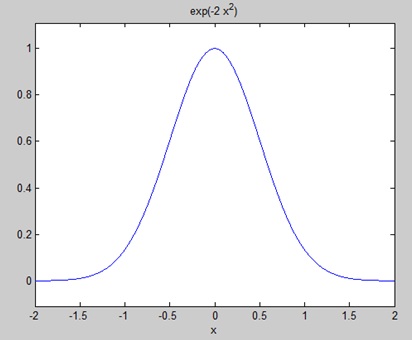
Create a script file and type the following code in it −syms x f = exp(-2*x^2); %our function ezplot(f,[-2,2]) % plot of our function FT = fourier(f) % Fourier transformWhen you run the file, MATLAB plots the following graph −
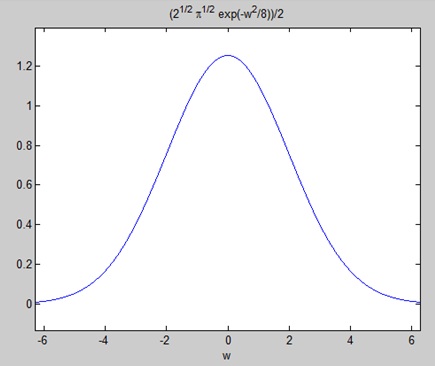
The following result is displayed −FT = (2^(1/2)*pi^(1/2)*exp(-w^2/8))/2Plotting the Fourier transform as −
ezplot(FT)Gives the following graph −
Inverse Fourier Transforms
MATLAB provides the ifourier command for computing the inverse Fourier transform of a function. For example,f = ifourier(-2*exp(-abs(w)))MATLAB will execute the above statement and display the result −
f =
-2/(pi*(x^2 + 1))


No comments:
Post a Comment