
Decision making structures require that the programmer should specify
one or more conditions to be evaluated or tested by the program, along
with a statement or statements to be executed if the condition is
determined to be true, and optionally, other statements to be executed
if the condition is determined to be false.
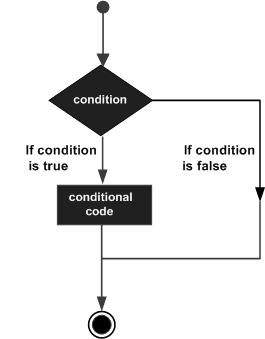
Following is the general form of a typical decision making structure found in most of the programming languages −
 MATLAB provides following types of decision making statements. Click the following links to check their detail −
Following is the general form of a typical decision making structure found in most of the programming languages −
MATLAB provides following types of decision making statements. Click the following links to check their detail −| Statement | Description |
|---|---|
| if ... end statement | An if ... end statement consists of a boolean expression followed by one or more statements. |
| if...else...end statement | An if statement can be followed by an optional else statement, which executes when the boolean expression is false. |
| If... elseif...elseif...else...end statements | An if statement can be followed by one (or more) optional elseif... and an else statement, which is very useful to test various conditions. |
| nested if statements | You can use one if or elseif statement inside another if or elseif statement(s). |
| switch statement | A switch statement allows a variable to be tested for equality against a list of values. |
| nested switch statements | You can use one switch statement inside another switch statement(s). |


No comments:
Post a Comment